
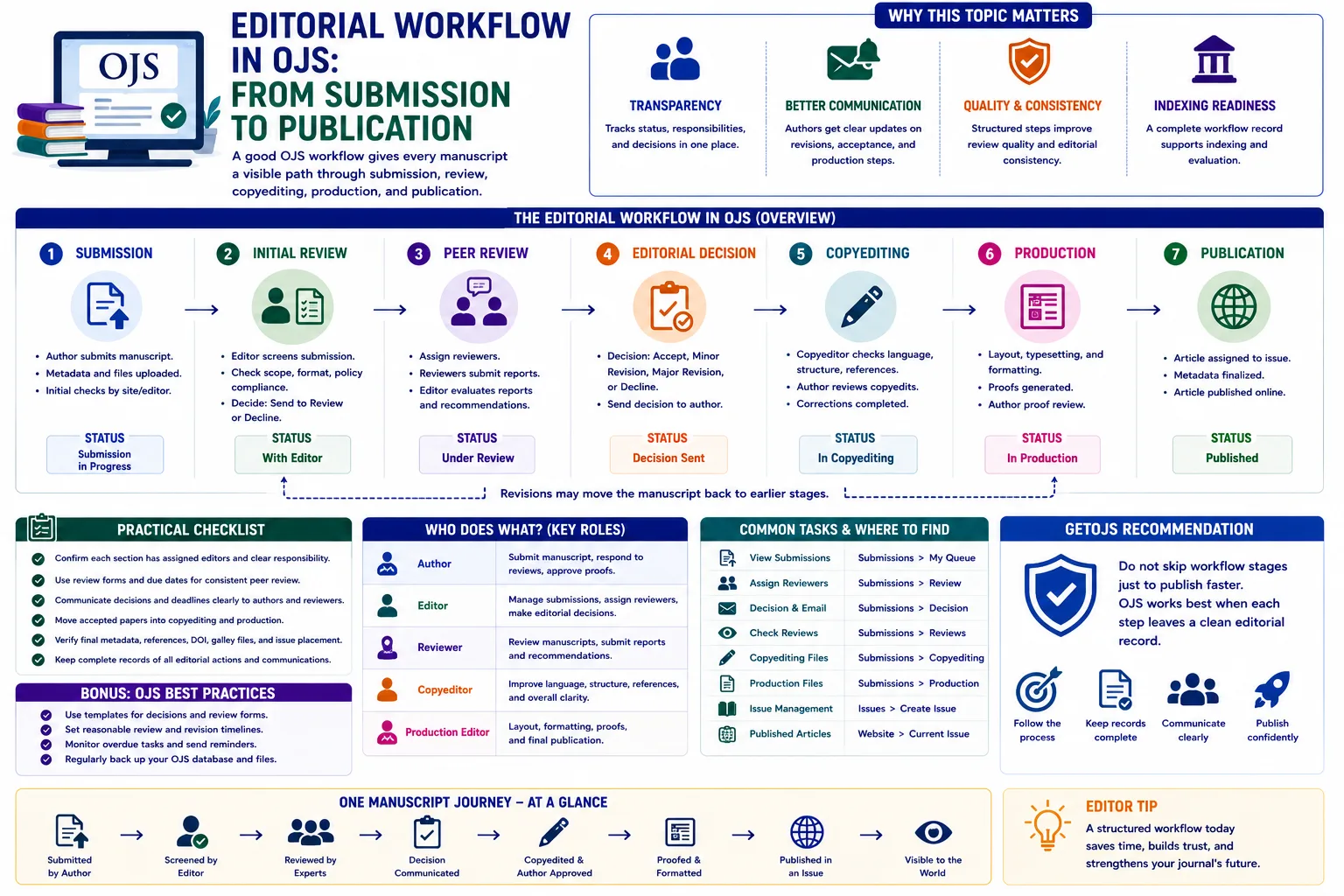
A good OJS workflow gives every manuscript a visible path through submission, review, copyediting, production, and publication. When the workflow is planned properly, editors know what to do next, authors receive clear communication, reviewers understand their responsibilities, and the journal keeps a reliable record of every editorial decision.
Introduction
Open Journal Systems, commonly known as OJS, is more than a place to upload articles and display published issues. It is a complete editorial management platform that helps journals organize manuscripts from the first author submission to the final published article. For many journals, the public website receives the most attention because it is visible to readers. However, the internal editorial workflow is equally important. A journal may have a beautiful homepage, strong aims and scope, and experienced editors, but if the workflow is unclear, submissions can be delayed, decisions can be missed, and authors may lose confidence in the journal.
The editorial workflow in OJS is designed around a structured publishing process. A manuscript normally begins as a submission from an author. It is then checked by the editorial office, assigned to an editor, reviewed by peer reviewers, revised by the author if required, accepted or declined by the editor, prepared through copyediting and production, and finally scheduled for publication. Each stage has its own purpose. Skipping these stages may seem faster at first, but it often creates confusion later when the journal needs to check reviewer comments, acceptance decisions, final files, metadata, DOI information, or publication history.
Why editorial workflow matters in OJS
A clear workflow protects the quality and credibility of the journal. Authors want to know that their manuscript has been received, reviewed, and processed fairly. Editors need a system where they can assign tasks, track deadlines, send decisions, and identify pending work. Reviewers need access to the manuscript, review guidelines, due dates, and response options. Production staff need the accepted version, corrected files, author details, references, galley files, and publication metadata. OJS brings these roles together in one system so that the publishing process does not depend only on personal email chains or offline files.
For journals that want to apply for indexing or improve editorial transparency, workflow records are especially valuable. A well-managed OJS installation can show when a submission was received, who handled it, which review round was completed, what decision was sent, and when the article was published. These records support accountability and make it easier for the journal team to respond to author queries, editorial audits, or internal quality checks.
1. Author submission stage
The workflow starts when an author submits a manuscript through the OJS submission form. During this stage, the author selects the journal section, enters article metadata, adds contributors, uploads the manuscript file, accepts submission requirements, and confirms the final submission. This stage looks simple, but it has a major impact on the rest of the workflow. If authors enter incomplete titles, missing affiliations, incorrect keywords, or poor abstracts, the editorial team must spend extra time correcting metadata later.
Journal teams should review their submission checklist carefully. The checklist can remind authors to remove identifying information for blind review, follow the journal template, include references, add ethics approval statements where required, and upload supplementary files if needed. Clear instructions reduce back-and-forth communication and help editors begin screening faster. The journal should also make sure that section policies are meaningful. For example, research articles, review articles, case studies, editorials, and short communications may follow different review expectations.
2. Initial editorial screening
After submission, the editorial office or assigned editor should perform an initial check. This step is sometimes called desk review, technical screening, or preliminary assessment. The goal is not to complete full peer review immediately. Instead, the editor checks whether the manuscript fits the journal scope, follows basic formatting requirements, includes required files, provides complete metadata, and meets ethical expectations.
At this point, the editor may decide to send the manuscript for review, request corrections from the author, or decline it without external review if it is clearly outside the journal scope. This stage saves reviewer time and protects the journal from processing unsuitable submissions. In OJS, editors can record decisions and communicate with authors through built-in email templates. This creates a cleaner record than sending separate personal emails outside the system.
3. Editor assignment and role clarity
OJS allows journals to assign section editors, journal editors, copyeditors, layout editors, and other roles depending on the configuration. Role clarity is very important. If every editor has access but no one is responsible, submissions can remain pending for weeks. Each journal section should have assigned editors who understand their responsibility. A manuscript should not sit in the dashboard without a clear next action.
For multi-journal or large publishing setups, role management becomes even more important. Editors should have access only to the journals and sections they manage. Reviewers should only see manuscripts assigned to them. Authors should see their own submissions. Administrators should monitor configuration, users, email templates, plugins, and overall system health. Good permissions reduce mistakes and help the editorial process remain organized.
4. Peer review stage
The review stage is one of the most important parts of the OJS editorial workflow. Editors can invite reviewers, set due dates, attach review files, use review forms, and send reminders. Reviewers can accept or decline the request, download the manuscript, submit comments, upload annotated files, and recommend a decision. OJS supports different review methods depending on the journal policy, such as double anonymous review, anonymous review, or open review when configured appropriately.
Review forms are useful when the journal wants consistent feedback. Instead of receiving unstructured comments only, editors can ask reviewers to assess originality, methodology, literature review, clarity, ethical compliance, references, language quality, and contribution to the field. This helps editors compare reviews more easily and makes decisions more balanced. Due dates should also be realistic. Very short deadlines can discourage reviewers, while very long deadlines can delay publication. A practical reminder policy is helpful for keeping review rounds active.
5. Editorial decision and revision rounds
After reviews are submitted, the editor evaluates the feedback and sends a decision to the author. Common decisions include accept submission, request revisions, resubmit for review, or decline submission. In many cases, the author must submit a revised file along with a response to reviewer comments. OJS can support multiple review rounds, which is useful when a paper requires major revision and another review is needed.
Editors should write decision letters carefully. A clear decision letter explains what the author must do, which reviewer points need attention, whether a revised manuscript is expected, and what deadline applies. Poor communication at this stage can create confusion. Authors may upload the wrong file, miss important corrections, or assume acceptance before the manuscript is actually accepted. A structured decision process keeps the record clear for both the author and journal team.
6. Copyediting after acceptance
Once a manuscript is accepted, it should move into copyediting. Copyediting is where the article is improved for language, consistency, formatting, style, references, headings, tables, figure captions, and journal-specific presentation. This stage should not be ignored. Even strong research can look unprofessional if the accepted manuscript contains inconsistent spelling, incomplete references, poor figure labels, or formatting errors.
In OJS, copyediting can involve copyeditors, editors, and authors. The copyedited file can be shared with the author for confirmation if the journal follows that process. The journal should decide who is responsible for checking grammar, reference style, equations, tables, ethical statements, author names, affiliations, funding information, acknowledgements, and conflict of interest statements. Copyediting also helps reduce metadata mistakes before publication.
7. Production and galley preparation
After copyediting, the article moves to production. Production is where the final publishable files are prepared. These files are often called galleys in OJS. A journal may publish PDF only, or it may publish HTML, XML, EPUB, or supplementary formats depending on its workflow. The production team should check that the final PDF opens correctly, contains the correct title and author list, includes page numbers if required, uses the journal branding properly, and matches the article metadata shown on the website.
This stage is also where DOI, issue assignment, publication date, license information, keywords, abstracts, references, and author details should be reviewed carefully. Many indexing and metadata problems begin at this stage because the final file and OJS metadata do not match. For example, the PDF may show one author affiliation while the article page shows another. A final production checklist reduces these errors and improves trust.
8. Scheduling and publication
When the article is ready, it can be scheduled for publication. Some journals publish articles inside regular issues, while others use continuous publication where articles are published as soon as they are ready. OJS supports issue management, current issue display, archives, sections, and article ordering. Before publishing, the editorial team should confirm that the article appears in the correct issue, the section is correct, the galley is attached, the DOI is active if used, and all public metadata is complete.
Publishing should not be treated as just clicking a final button. It is the moment when the article becomes part of the journal record. Errors made here may be visible to readers, authors, indexing services, and search engines. A final review by the editor or production manager is strongly recommended before releasing the issue or article.
Common workflow problems in OJS
Many workflow issues happen because journals use OJS only partially. For example, some teams receive submissions in OJS but conduct review by personal email. Others accept papers and directly upload final PDFs without using copyediting or production stages. Some journals create too many user roles without clear responsibility. Others do not customize email templates, so authors receive generic or confusing messages. These practices may work for a small number of papers, but they become difficult to manage as submission volume grows.
Another common issue is incomplete metadata. If titles, abstracts, author details, references, DOI information, and keywords are not checked before publication, the article may look incomplete or may not be harvested correctly by external services. Workflow quality and metadata quality are connected. A clean editorial process gives the team time to check each detail before publication.
Practical checklist for journal teams
- Confirm that each journal section has a responsible editor or section editor.
- Update the submission checklist so authors upload complete and correct files.
- Use review forms and reviewer deadlines to make peer review more consistent.
- Keep editorial decisions inside OJS so the submission record remains complete.
- Move accepted papers through copyediting and production instead of publishing directly from review.
- Check final metadata, galley files, references, DOI, license, and issue placement before publication.
GetOJS recommendation
Do not skip workflow stages just to publish faster. OJS works best when each step leaves a clean editorial record. A strong workflow should be simple enough for editors to follow, detailed enough to protect publication quality, and consistent enough to support future indexing, reporting, and editorial evaluation. GetOJS recommends reviewing the full submission-to-publication journey before making theme, plugin, or customization changes. When the workflow is clear first, technical improvements become easier and more effective.
For new journals, the best approach is to start with a practical workflow and improve it over time. For existing journals, it is useful to audit recent submissions and identify where delays happen. Are papers waiting for editor assignment? Are reviewers missing deadlines? Are accepted papers stuck in production? Are final PDFs being published with incomplete metadata? Once these points are visible, the journal can improve OJS settings, roles, templates, reminders, and production checklists. A journal with a clean workflow can publish more confidently and offer a better experience to authors, reviewers, editors, and readers.
Need help applying this to your journal?
Our team can help configure, migrate, secure, customize, or maintain your OJS journal website.