
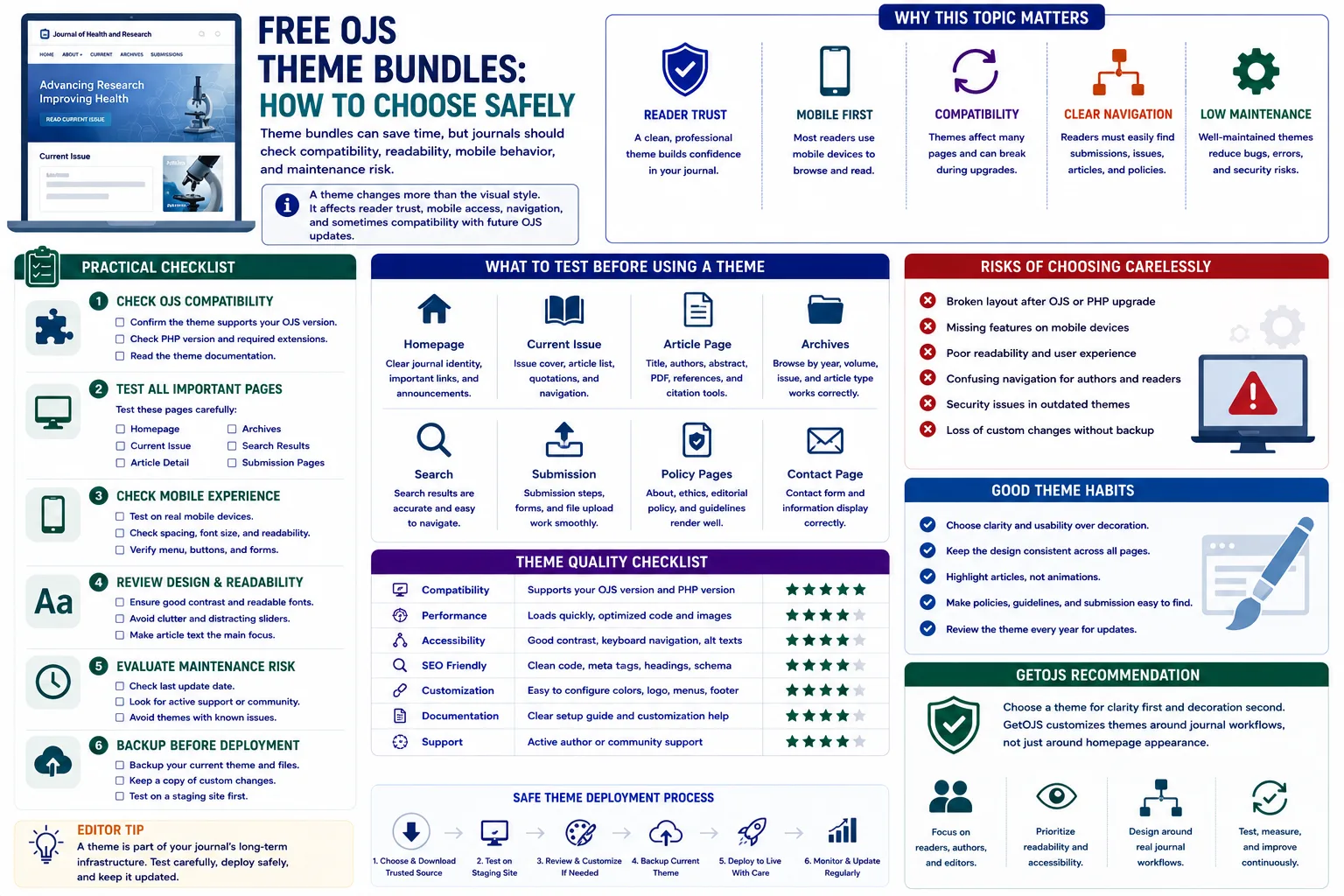
A free OJS theme bundle can be a good starting point for a journal website, but it should never be installed only because it looks attractive in a preview. A theme affects the way readers discover articles, how authors understand submission steps, how editors present policies, and how easily the site can be upgraded in the future.
Why free OJS theme bundles need careful review
Open Journal Systems is used by universities, independent publishers, societies, research groups, and open access journals across many subjects. Because OJS already provides a strong publishing workflow, many journal teams look for free theme bundles to improve the public website quickly. This is understandable. A clean homepage, modern cards, better menus, and attractive article lists can immediately make a journal feel more professional. However, a theme is not just a decorative layer. It changes the reader’s first impression, the author’s journey, and sometimes the structure of templates that display metadata, issues, archives, and galley files.
The safest way to choose a free OJS theme bundle is to treat it like a publishing infrastructure decision, not like a simple design download. A bundle may include multiple themes, child themes, stylesheets, template overrides, JavaScript files, image assets, and configuration notes. Some bundles are prepared for specific OJS versions, while others are older and may not work properly with newer releases. Some look good on the homepage but create spacing problems on article pages. Some include unnecessary animation, heavy images, or third-party scripts that slow down the journal. Before using any free bundle, the journal team should review compatibility, readability, accessibility, security, maintenance, and workflow impact.
Start with OJS version compatibility
The first checkpoint is the exact OJS version. A theme created for OJS 3.1 or 3.2 may not work correctly in OJS 3.3, 3.4, or 3.5 without changes. Template file names, hooks, variables, plugin structures, and frontend components may change between major releases. If the theme overrides core templates, even a small version mismatch can cause broken menus, missing article metadata, layout errors, or blank pages. This is why journals should never assume that a free theme is safe only because it is labelled as an OJS theme.
Before installation, check whether the bundle clearly mentions supported versions. Look for documentation, release notes, GitHub tags, changelog files, or comments from the maintainer. If there is no version information, test the theme only on a staging copy. In OJS, staging means a separate copy of the same journal files and database where changes can be tested without disturbing authors, reviewers, editors, or readers. A theme should be tested on the current issue page, archive page, article detail page, search page, announcement page, editorial team page, login page, registration page, and submission pages. A theme that passes only the homepage test is not ready for live use.
Review readability before visual style
A journal website is not a portfolio website. Its main purpose is to help readers find, read, cite, and trust research content. For this reason, readability should come before decoration. Many free theme bundles use large banners, strong colors, oversized sliders, or decorative fonts. These elements may look impressive in screenshots, but they can make abstracts, author names, references, keywords, and PDF links harder to scan. A safe OJS theme should use comfortable font sizes, proper line height, clear headings, enough white space, and strong contrast between text and background.
Article pages deserve special attention. The article title should be clear. Author details should not be hidden. DOI, publication date, abstract, keywords, references, and download buttons should be easy to identify. The PDF or HTML galley button should be visible without visual confusion. If the theme makes these elements too small, too light, or too scattered, readers may leave the site quickly. Indexing teams, reviewers, and academic visitors also look for structured information. A beautiful theme that weakens article clarity can reduce trust instead of improving it.
Check mobile behavior carefully
A large percentage of visitors now open journal websites on mobile devices. Authors may check submission guidelines from a phone, reviewers may open editorial messages while travelling, and readers may access an article link shared through email or social media. Therefore, mobile testing is essential before choosing a free OJS theme bundle. Do not only shrink the browser window on a desktop. Open the site on real phones when possible and test menus, dropdowns, search, issue lists, article pages, PDF buttons, forms, and footer links.
Common mobile problems include overlapping logos, menus that do not close, dropdowns that go outside the screen, article titles with broken spacing, tables that overflow, images that do not resize, and sidebar widgets appearing before the main content. If the theme uses a fixed header, check whether it hides page headings or submission form fields. If the theme uses large hero sections, verify that users do not need to scroll too much before reaching the actual journal content. A safe theme should make mobile navigation simple, not just visually responsive.
Inspect navigation and journal workflow
OJS has many important user paths. Readers look for current issues, archives, article search, announcements, and editorial policies. Authors look for author guidelines, submission preparation checklist, publication fees, copyright information, and login or registration links. Reviewers need easy access to their dashboard after login. Editors need a public site that explains the journal’s identity clearly. A free theme bundle should support these paths instead of hiding them behind decorative sections.
Before selecting a theme, map your main navigation. Include Home, Current Issue, Archives, About, Editorial Team, Submissions, Author Guidelines, Contact, and any indexing or ethics pages required by the journal. Then check whether the theme can display these links neatly on desktop and mobile. If the theme forces too many items into a small menu or makes the “Submit” action hard to find, it may not be suitable. For scholarly publishing, simple navigation is often more valuable than complex animation.
Look for unnecessary code and heavy assets
Free theme bundles sometimes include extra JavaScript libraries, unused CSS, demo images, sliders, icon sets, animation plugins, and custom scripts. Every extra asset can increase page load time and maintenance risk. A slow journal website creates a poor reader experience and may affect search visibility. It can also frustrate editors working on slower connections. Before using a bundle, review file size, image compression, script count, and browser console errors.
Large homepage banners should be optimized. Images should use suitable dimensions and modern formats where possible. CSS should not contain thousands of unused rules copied from unrelated templates. JavaScript should not create errors on pages where certain elements do not exist. If the theme includes third-party scripts, check why they are needed. Avoid adding tracking, external widgets, or unknown scripts without a clear reason. In journal publishing, performance and reliability are more important than unnecessary effects.
Review accessibility and contrast
Accessibility is important for all journal websites. Readers may include students, senior researchers, people with visual limitations, and users accessing content on different devices. A free OJS theme should use readable contrast, keyboard-friendly navigation, meaningful link text, proper heading hierarchy, and visible focus states. Buttons should not rely only on color. Links should be easy to distinguish. Form fields should be readable and usable.
Check whether the theme uses semantic HTML where possible. Headings should follow a logical structure. Article titles should not be converted into images. Menu buttons should be usable with keyboard navigation. Alt text should be provided for important images. Decorative images should not distract from academic content. Accessibility is not only a compliance topic; it improves the experience for every visitor.
Check theme maintenance and source quality
A free theme bundle is safer when it has an active maintainer, clear source, and understandable code. If the theme is downloaded from an unknown website, inspect it carefully before installation. Check whether the package includes documentation, license information, version notes, and installation steps. If the code is heavily modified but undocumented, future developers may struggle to update it. This becomes a serious issue when the journal later needs an OJS upgrade.
Review template overrides carefully. If the theme overrides many core files, it may be harder to maintain. If changes are mostly in CSS, the risk is usually lower. Keep a record of all modified files and custom CSS. If you customize a free theme further, document the changes with dates and notes. This helps when debugging issues later. For example, if the article page breaks after an upgrade, a developer can quickly check whether the issue comes from the OJS core, a plugin, or the theme override.
Test with real journal content
Demo content rarely exposes real problems. A theme may look perfect with short titles, clean images, and balanced text. Real journals often have long article titles, multiple authors, long abstracts, bilingual content, special characters, mathematical symbols, tables, supplementary files, and long menus. Always test the theme with your actual journal data. Open old issues, new articles, announcements, editorial pages, and submission information pages.
Check how the theme handles long titles in cards and lists. Check whether author names wrap properly. Test articles with many keywords. Review archive pages with multiple years and issues. Open PDF galley links. Check citation tools, metrics, and plugins if your journal uses them. If the journal is multilingual, switch languages and inspect layout changes. A safe theme should support real publishing complexity, not only sample pages.
Backup before installation
Before installing or activating any free OJS theme bundle on a live site, take a full backup of files and database. OJS settings, theme selections, plugin settings, uploaded assets, and custom pages may all be affected during theme work. If the new theme causes problems, the backup gives you a safe rollback option. Without a backup, even a small theme issue can become stressful, especially when submissions are active or an issue is being published.
The best practice is to install and test the theme on staging first. After testing, prepare a deployment plan. Note the current theme, new theme, files changed, custom CSS added, and rollback steps. Do the live change during a low-traffic period. After activation, clear template cache, browser cache, CDN cache, and any server-level cache if used. Then test the public site and logged-in user areas again.
Practical checklist before choosing a free OJS theme bundle
- Confirm the theme supports your exact OJS version before installation.
- Test homepage, current issue, archive, article detail, search, login, registration, and submission pages.
- Review article readability, PDF button visibility, author details, DOI display, and metadata structure.
- Check mobile menu, spacing, footer, sidebar placement, and form usability on real devices.
- Inspect unnecessary scripts, large images, browser console errors, and page speed impact.
- Review accessibility basics such as contrast, link visibility, headings, and keyboard navigation.
- Keep a full backup and test everything on staging before applying the theme to the live journal.
When a free theme is a good choice
A free OJS theme bundle can be a good choice when the journal needs a simple visual improvement, has a limited budget, and can test the theme properly. It is especially useful for new journals that want a clean layout without heavy customization. However, the theme should still match the journal’s subject, branding, workflow, and long-term maintenance plan. The best free theme is not always the most stylish one. It is the one that presents scholarly content clearly, works with the current OJS version, performs well on mobile, and can be maintained safely.
GetOJS recommendation
GetOJS recommends choosing free OJS theme bundles with caution and structure. Start with compatibility, then readability, then mobile behavior, then performance, then customization. Do not install multiple themes randomly on a live journal. Do not keep unused themes or old theme files if they are no longer needed. Keep the theme stack clean, documented, and easy to upgrade. A safe theme should support the journal’s publishing goals instead of creating hidden technical problems.
For many journals, the best route is to start with a reliable base theme and customize it carefully. This approach gives the journal a unique identity while keeping the code easier to manage. A theme should help readers trust the journal, help authors submit confidently, and help editors maintain the site without confusion. When selected carefully, a free OJS theme bundle can save time and cost. When selected carelessly, it can create design, workflow, and upgrade problems that cost more later.
Need help applying this to your journal?
Our team can help configure, migrate, secure, customize, or maintain your OJS journal website.