
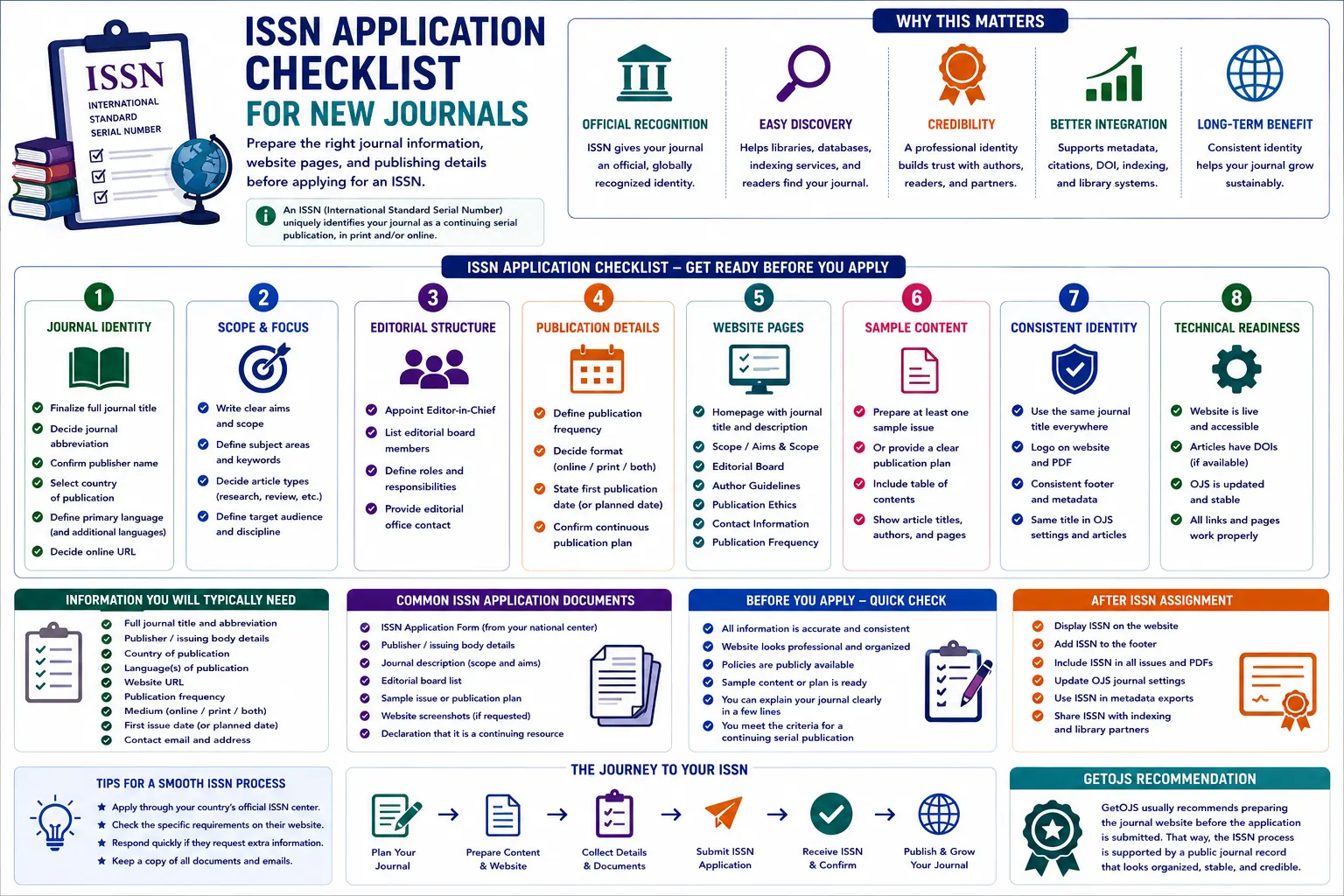
An ISSN application becomes easier when the journal has a clear identity, publishing plan, and public-facing information already in place. For a new OJS journal, the goal is not only to request a number, but to show that the journal is a real continuing publication with stable title information, publisher details, editorial structure, and a reliable online presence.
Why ISSN preparation matters for new journals
An ISSN is an important identifier for serial publications such as journals, magazines, continuing conference proceedings, and other ongoing resources. For academic journals, it helps libraries, indexing databases, citation systems, repositories, publishers, and readers identify the title accurately. A new journal may have a professional website and strong editorial team, but if the title details are unclear or inconsistent, the application process can become slow and confusing.
Many new journal teams think the ISSN process begins only when they fill out the application form. In practice, preparation starts much earlier. The journal website should clearly show the title, scope, publisher, publication frequency, editorial information, contact details, and access model. If the journal is using Open Journal Systems, these details should be configured in the journal settings, visible on public pages, and reflected consistently across the homepage, article pages, PDF files, metadata records, and footer text.
The checklist below is written for journal owners, publishers, editors, universities, societies, and research groups who are preparing a new OJS journal. It explains what to prepare before applying, what to verify on the website, and how to avoid common mistakes that can create delays.
1. Finalize the exact journal title
The journal title is the most important identity element in an ISSN application. Before applying, decide the exact title that will appear everywhere. Avoid changing capitalization, punctuation, spelling, or word order between different pages. For example, if the official title is International Journal of Advanced Research in Health Sciences, do not use a shortened version on the homepage, a different abbreviation in the logo, and another variation in PDF headers.
Check the title in these places before submission: the OJS journal name setting, website logo, browser title, homepage heading, footer, editorial policy pages, author guidelines, sample issue, article landing pages, PDF first page, email templates, and metadata exports. If your journal also uses a subtitle, decide whether the subtitle is part of the official title or only a descriptive tagline. This distinction matters because title identity should remain stable over time.
2. Confirm publisher and ownership details
The application should clearly identify who publishes the journal. This may be a university department, research society, academic publisher, institute, association, or organization. The publisher name should be written consistently on the website and in OJS settings. Add a simple publisher statement on the homepage, footer, or about page so visitors can immediately understand who is responsible for the journal.
New journals should also prepare the publisher address, country, official contact email, and website URL. If the journal is managed by one organization but owned by another, explain the relationship clearly. For example, a journal may be published by a society and technically maintained by an OJS service provider. In that case, the publisher identity should not be confused with the technical support provider. A clean separation improves transparency and avoids metadata confusion later.
3. Prepare the journal scope and aims page
An ISSN application is stronger when the journal scope is visible and specific. The aims and scope page should explain the subject area, article types, target audience, and research coverage. Avoid vague claims such as “all fields of science” unless the journal truly has a multidisciplinary editorial model. A focused scope helps authors understand whether their paper is suitable and helps evaluators understand the journal’s purpose.
For OJS journals, add the scope in a public page such as About the Journal, Aims and Scope, or Journal Information. You can also include subject keywords and covered disciplines. If the journal accepts research articles, review articles, case studies, short communications, editorials, conference papers, or technical notes, mention them clearly. This information supports the identity of the serial publication and helps future indexing applications as well.
4. Display the editorial board properly
A peer-reviewed journal should have a visible editorial board. The board page should include names, affiliations, countries, and roles such as Editor-in-Chief, Managing Editor, Associate Editor, Section Editor, Editorial Board Member, or Advisory Board Member. Keep the format clean and professional. Avoid placing the whole board inside an image because text-based information is easier for readers, search engines, and evaluators to review.
Before the ISSN application, confirm that editorial names are spelled correctly and that affiliations are current. If possible, use institutional email addresses or profile links where appropriate. The editorial board does not need to be overly large, but it should look credible and relevant to the journal scope. A strong board page also helps authors trust the journal before submitting manuscripts.
5. Publish author guidelines and submission information
Author guidelines show that the journal is prepared to receive manuscripts in a structured way. The guidelines should explain article formatting, manuscript structure, citation style, file requirements, word limits if any, ethical expectations, plagiarism policy, review process, copyright policy, license information, and publication fees if applicable.
In OJS, the submission workflow can include checklists that authors must accept before uploading files. Match those submission checklist items with the public author guidelines. For example, if your website says authors must submit a conflict-of-interest statement, make sure the submission checklist also asks for it. If the journal charges no APC, clearly state that. If fees apply, explain what is charged, when it is charged, and whether waivers are available.
6. Clarify publication frequency
ISSN agencies need to understand that the journal is a continuing publication. Publication frequency helps show that plan. Common options include annual, biannual, quarterly, monthly, continuous publication, or publish-as-ready. Choose a model that your team can realistically maintain. Do not promise monthly issues if the journal team can only manage two issues per year.
Display the frequency on the About page or a separate Publication Frequency page. Also configure issue settings in OJS so the archive structure matches the stated model. If the journal follows continuous publication, explain how articles are assigned to volume, issue, year, page numbers, or elocation IDs. A clear frequency statement helps authors, readers, libraries, and indexing teams understand how content will be released.
7. Prepare issue and article structure
Some ISSN processes may ask for evidence of publication or a sample issue, depending on the country and the type of application. Even when a full issue is not required, it is helpful to prepare the journal structure before applying. In OJS, this means setting up sections, issue labels, volume and issue numbering, publication year, and article display format.
If your journal is new, you can prepare a “Current Issue” page with sample or first accepted articles only when they are ready for publication. Do not publish placeholder articles just to fill space. Every article should have complete metadata, author details, abstract, keywords, PDF file, and publication date. If the journal has not yet published content, provide a clear publication plan and make sure the website does not look incomplete.
8. Check website pages required for trust
A new journal website should include more than a homepage. Before applying for an ISSN, review whether the following pages are visible: About the Journal, Aims and Scope, Editorial Board, Author Guidelines, Peer Review Policy, Publication Ethics, Plagiarism Policy, Copyright and Licensing, Publication Frequency, Contact, Privacy Statement, and Archives or Current Issue.
These pages do not need to be overly complicated, but they should be clear, readable, and consistent. Avoid copied policy text that does not match your journal’s real workflow. For example, do not claim double-blind peer review if your journal actually uses single-blind review. Do not say the journal is indexed in databases where it is not yet included. Honest and accurate information is better than exaggerated claims.
9. Make contact details visible
Contact information is essential for trust and communication. Add the official journal email, publisher address, and support contact where appropriate. If different teams handle editorial queries and technical support, separate those contact points. For example, use one email for manuscript or editorial communication and another for website or OJS support.
In OJS, configure the principal contact, technical support contact, and sender email properly. Test outgoing emails before launch. If authors register or submit manuscripts but never receive system emails, the journal will face support issues quickly. A working email setup also helps during ISSN and indexing communication.
10. Keep title and metadata consistent across OJS
OJS stores journal information in multiple places. Review Settings > Journal, Settings > Website, masthead content, navigation menus, custom pages, email templates, and plugin settings. Make sure the journal title, publisher name, contact information, ISSN status, and URL are consistent. If you are applying for an online ISSN, the journal’s online URL should be stable and publicly accessible.
Also check SEO tags, canonical URL, Open Graph metadata, sitemap, and robots settings if your site uses custom HTML pages. These items do not replace the ISSN application, but they help search engines and visitors understand the journal correctly. A clean technical foundation reduces future corrections in Google Scholar, Crossref, indexing systems, and library catalogues.
11. Avoid common ISSN application mistakes
- Using different journal title versions in the logo, homepage, PDF, and metadata.
- Applying before the journal website has basic public pages and contact information.
- Listing false indexing claims or unclear publisher details.
- Publishing placeholder content instead of real article or issue information.
- Not checking email delivery, contact forms, and submission settings before launch.
Practical ISSN readiness checklist
- Finalize the official journal title, abbreviation, publisher name, country, language, and journal URL.
- Publish clear pages for aims and scope, editorial board, author guidelines, ethics, peer review, contact, and publication frequency.
- Check that title and publisher information match across the logo, homepage, metadata, footer, PDF files, and OJS settings.
- Prepare issue structure, article sections, sample issue or publication plan as required by the local ISSN process.
- Test website navigation, submission forms, user registration, email delivery, and contact information before sharing the application.
GetOJS recommendation
GetOJS usually recommends preparing the journal website before the ISSN application is submitted. That way, the application is supported by a public journal record that looks organized, stable, and credible. A well-prepared OJS journal also becomes easier to maintain after the ISSN is assigned because the same information will later support DOI setup, indexing applications, metadata exports, author communication, and long-term journal branding.
For new journals, the best approach is simple: finalize the identity, publish transparent pages, configure OJS carefully, test the workflow, and then apply. This reduces delays and gives your journal a stronger foundation for future growth.
Need help applying this to your journal?
Our team can help configure, migrate, secure, customize, or maintain your OJS journal website.