
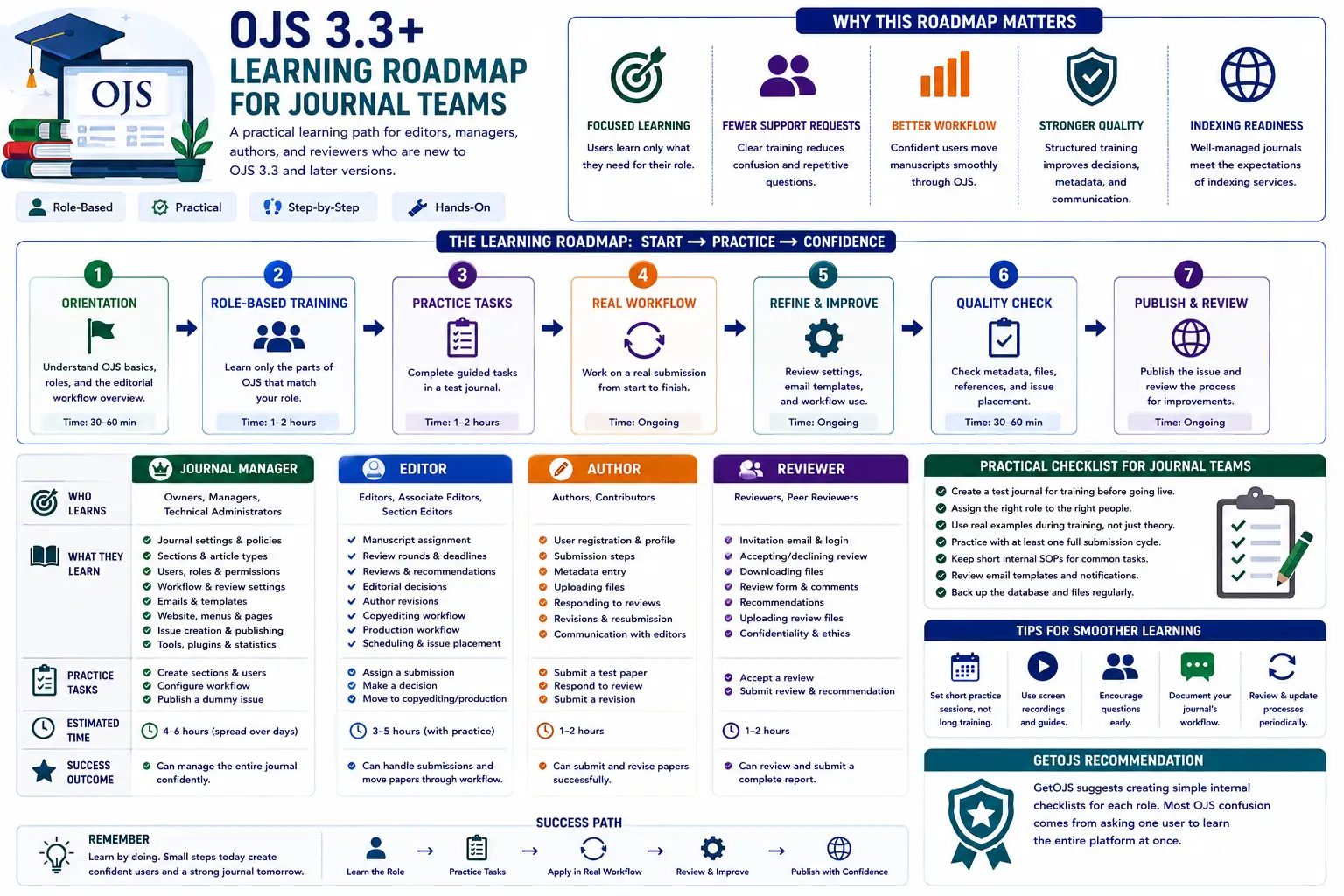
OJS becomes easier when each user learns only the parts of the system that match their role. A clear roadmap helps journal managers, editors, section editors, authors, reviewers, copyeditors, and production staff understand what they need to do without forcing everyone to learn the entire platform at once.
Why a learning roadmap is important
Open Journal Systems is not only a website builder for academic journals. It is a complete editorial and publishing management system. A journal team can use OJS to receive submissions, assign editors, manage peer review, record editorial decisions, copyedit accepted manuscripts, prepare production files, publish issues, maintain metadata, and communicate with authors and reviewers. Because the platform covers so many stages, new users often feel confused when they first log in. They may see menus such as Submissions, Issues, Users & Roles, Workflow Settings, Website Settings, Distribution, and Plugins without knowing which area is relevant to their responsibility.
A learning roadmap solves this problem by dividing OJS training into practical steps. Instead of asking a reviewer to understand journal setup, or asking an author to learn editorial decisions, each user learns the exact tasks connected to their role. This saves time, reduces mistakes, and makes the journal workflow smoother. For OJS 3.3 and later versions, this role-based learning approach is especially useful because the system has many configurable areas and a modern workflow structure that separates submission, review, copyediting, and production stages.
Start with the basic OJS structure
The first step for every journal team is to understand the difference between the public website and the editorial dashboard. The public website is what readers, authors, and visitors see. It contains the journal homepage, current issue, archives, articles, announcements, editorial board pages, author guidelines, contact details, and other informational pages. The editorial dashboard is the private working area where journal staff manage submissions, users, roles, issues, publication settings, emails, and workflow actions.
Beginners should first learn how these two sides connect. For example, when a manager updates journal description, masthead, editorial policies, or author guidelines, the changes may appear on the public website. When an editor accepts and schedules a submission, that manuscript later becomes visible as a published article. When metadata is incomplete inside the dashboard, the public article page can also look incomplete. Understanding this connection helps teams avoid one of the most common OJS mistakes: treating public design and editorial data as separate things.
Roadmap for Journal Managers
Journal Managers need the broadest OJS training because they control setup, configuration, and user permissions. Their roadmap should begin with journal identity and basic settings. They should learn how to update the journal title, initials, publisher information, ISSN, contact email, principal contact, technical support contact, logo, homepage content, and navigation menus. They should also understand how to manage static pages, sidebar blocks, announcements, and footer content if these features are enabled on the site.
The second learning area for managers is Users & Roles. In OJS, one person can have multiple roles, such as Author, Reviewer, Editor, Section Editor, Journal Manager, or Reader. Managers should learn how to create users, assign roles, disable accounts when needed, check duplicate users, and guide people through password reset issues. They should also know that giving too many users high-level access can create security and workflow problems. A reviewer does not need manager access, and an author should not be given editorial permissions unless they are truly part of the editorial team.
The third area is workflow configuration. Managers should review submission requirements, checklist items, review settings, review forms, email templates, publication settings, section policies, and distribution metadata. They should know where to configure copyright notices, license information, privacy statements, indexing information, and DOI-related settings if the journal uses DOI registration. This does not mean the manager must personally perform every editorial task, but they should understand how the system is configured so they can support the rest of the team.
Roadmap for Editors and Section Editors
Editors and Section Editors should focus on submissions and decision-making. Their learning path begins with the submissions dashboard. They should understand the difference between unassigned submissions, active submissions, archived submissions, review stages, and production-ready items. They should learn how to open a submission record, read metadata, inspect uploaded files, assign participants, and communicate with the author inside the system.
The review stage is the most important area for editors. They should learn how to select reviewers, send review requests, set due dates, use review forms, monitor responses, read reviewer comments, request revisions, start a new review round, and record decisions. Editors should also understand that OJS keeps a history of editorial activity. This record is useful for transparency, but it also means decisions should be entered carefully and consistently.
After acceptance, editors should not publish directly without checking the next stages. A strong roadmap teaches editors to move accepted manuscripts into copyediting and then production. They should verify that the final title, abstract, keywords, author order, affiliations, references, funding information, and galley files are correct. They should also coordinate with production staff to make sure the final PDF, HTML, XML, or supplementary files are ready before scheduling the article in an issue.
Roadmap for Authors
Authors need a simple and practical learning path. They should not be overwhelmed with manager-level settings. Their roadmap should cover registration, profile completion, new submission steps, file upload, metadata entry, author confirmation, revision upload, and communication with the editorial office. Authors should understand that the submission form is not only a file upload form. The metadata they enter becomes part of the journal record and may later appear on the article page, in indexing exports, and in DOI metadata.
Author training should strongly emphasize accurate metadata. Names should be spelled correctly, affiliations should be complete, ORCID details should be added when available, abstracts should be clean, keywords should be meaningful, and references should follow the journal’s style. If authors enter incomplete or careless information, editors and production staff must spend extra time correcting it later. A good author guide can reduce this problem by showing screenshots of each submission step and explaining what information is expected.
Roadmap for Reviewers
Reviewers usually need the shortest training path. They should learn how to respond to a review invitation, accept or decline the request, download review files, read review instructions, submit confidential comments to the editor, submit comments for the author, upload an annotated file if needed, and select a final recommendation. Reviewers should also know where to check due dates and how to contact the editor if they need more time.
Many journals lose time because reviewers are unsure how to submit their recommendation or where to upload feedback. A short reviewer guide with screenshots can prevent delays. It is also useful to explain the difference between comments for the author and private comments for the editor. This protects confidential editorial discussion and keeps the review process professional.
Roadmap for Copyediting and Production Teams
Copyeditors and production staff should learn the post-acceptance workflow. Their training should cover how to access accepted files, upload copyedited versions, communicate with authors about corrections, confirm final files, prepare galley formats, and pass the article to production. Production staff should also know how to upload final PDFs, supplementary files, HTML files, or XML files, depending on the journal’s publishing model.
This stage requires careful quality control. The production team should compare the final article files with the metadata in OJS. The title, author names, affiliations, abstract, keywords, DOI, page numbers, issue assignment, publication date, references, and license information should match. If the PDF says one thing and the OJS article page says another, readers and indexing services may receive inconsistent information. A learning roadmap should therefore include a final publication checklist.
Suggested training sequence for new teams
For a new journal team, the best training sequence is not to begin with every setting. Start with the full journey of one sample manuscript. Create a test author, submit a sample article, assign an editor, invite a reviewer, record a decision, request a revision, accept the manuscript, move it into copyediting, prepare a galley, schedule it in an issue, and publish it in a test environment. This hands-on exercise gives the team a complete visual understanding of how OJS works from beginning to end.
After the full sample workflow, divide training by role. Managers can continue with settings and configuration. Editors can practice review rounds and decisions. Authors can practice submission and revision. Reviewers can practice accepting invitations and submitting feedback. Production staff can practice galley upload and issue scheduling. This method is more effective than a long lecture because users learn by performing the exact tasks they will later handle on the live journal.
Common mistakes to avoid
- Giving every team member Journal Manager access instead of assigning proper role-based permissions.
- Publishing articles without checking metadata, final files, DOI information, and issue placement.
- Skipping copyediting and production stages just to move faster.
- Training only one person and then depending on that person for every OJS task.
- Changing email templates, plugins, themes, or workflow settings directly on the live site without testing first.
Practical checklist
- Create separate training notes for managers, editors, authors, reviewers, and production users.
- Use a test submission to demonstrate the complete journey from upload to publication.
- Keep screenshots of common actions such as assigning reviewers, uploading revisions, and scheduling articles.
- Review user permissions every few months and remove unnecessary high-level access.
- Maintain a publication checklist for metadata, files, DOI, license, issue, and final public display.
GetOJS recommendation
GetOJS suggests creating simple internal checklists for each role. Most OJS confusion comes from asking one user to learn the entire platform at once. A better approach is to start with the complete publishing journey, then train each role only on the actions they need. This keeps the team confident, reduces support requests, protects the editorial record, and helps the journal publish with fewer mistakes.
For journals using OJS 3.3 and later versions, training should be treated as part of the publishing infrastructure. A good theme, stable hosting, plugins, DOI setup, and indexing preparation are important, but the platform works best when the editorial team understands how to use it correctly. With a clear roadmap, even a beginner team can move from basic login confidence to a disciplined submission, review, production, and publication process.
Need help applying this to your journal?
Our team can help configure, migrate, secure, customize, or maintain your OJS journal website.