
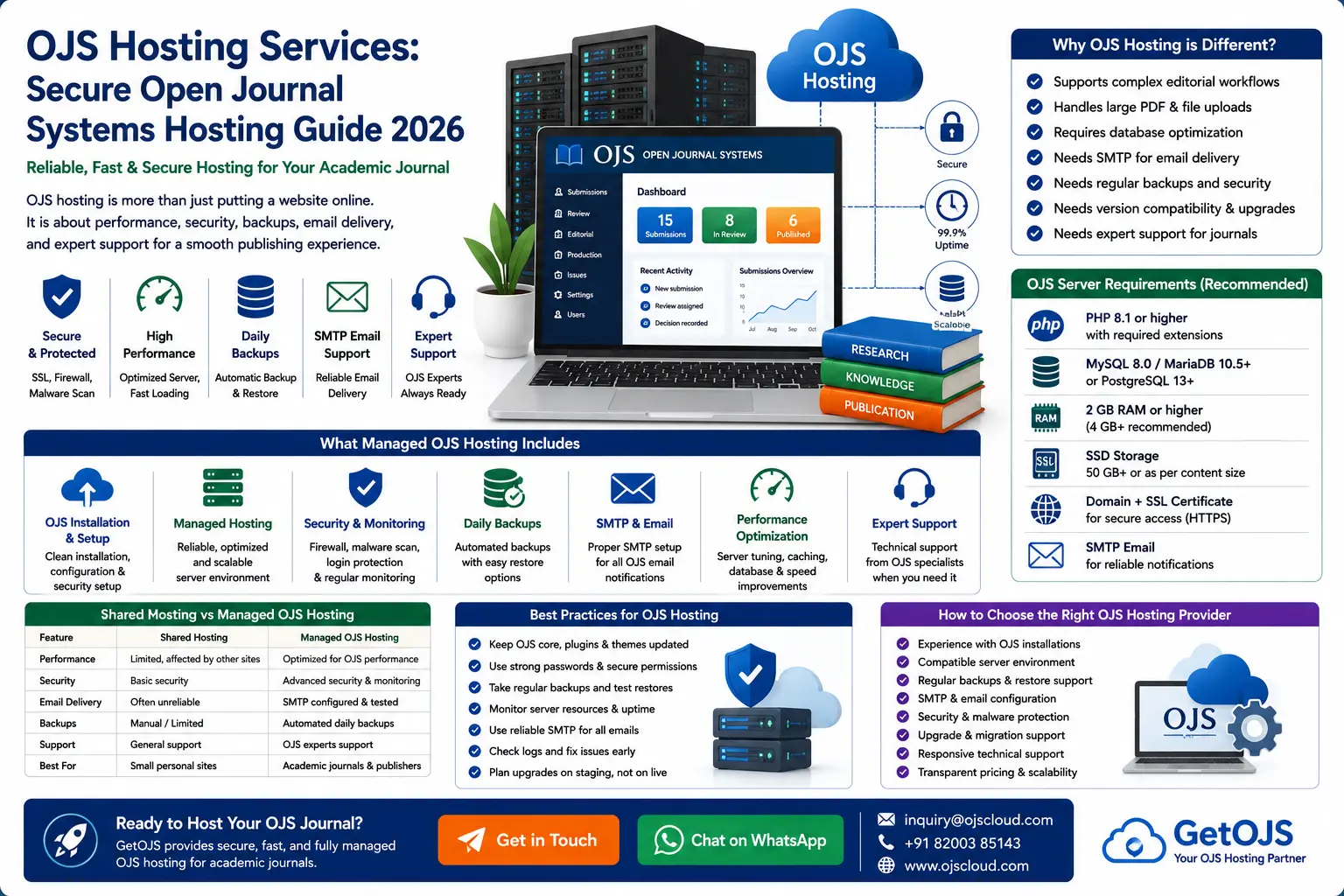
OJS hosting is not only about putting a journal website online. A successful Open Journal Systems installation needs the right server environment, secure configuration, reliable email delivery, regular backups, and technical support that understands scholarly publishing workflows.
What is OJS hosting?
OJS hosting is a specialized web hosting environment designed for Open Journal Systems, the open-source platform used by journals to manage submissions, peer review, editorial decisions, production files, issues, article metadata, and public publishing. Unlike a normal brochure website, an OJS journal stores sensitive author information, reviewer activity, editorial files, publication galleys, email templates, article metadata, and journal settings. Because of this, the hosting environment must be stable, secure, and compatible with the OJS version being used.
A good OJS hosting setup includes a compatible PHP version, MySQL or PostgreSQL database, secure file permissions, SSL certificate, SMTP email configuration, sufficient storage, regular backups, cron job support, and server-level security controls. It should also be prepared for real publishing tasks such as PDF downloads, article searches, metadata exports, DOI plugins, indexing tools, theme assets, and author submission uploads.
Why OJS hosting is different from normal web hosting
Many journals begin with low-cost shared hosting because it seems simple and affordable. However, OJS is not the same as a static HTML site or a basic company profile website. OJS runs multiple workflows in the background. Editors assign submissions, reviewers upload comments, authors revise files, production teams add galleys, and journal managers configure sections, users, languages, plugins, and email templates. If hosting is slow or unstable, every part of the editorial process becomes frustrating.
Normal shared hosting may also limit important requirements such as file upload size, PHP execution time, memory limits, database connections, scheduled tasks, and email sending. These limits can cause blank pages, failed uploads, email delivery problems, plugin errors, and slow article pages. Managed OJS hosting solves these issues by configuring the server specifically for OJS publishing instead of treating the journal like an ordinary website.
Why academic journals need reliable hosting
An academic journal depends on trust. Authors must feel confident submitting manuscripts. Reviewers need easy access to files and review forms. Editors need a reliable dashboard. Readers expect article pages, PDFs, archives, and metadata to load quickly. Indexing services and search engines need stable URLs and accessible article pages. If the journal is frequently offline, slow, or infected with malware, its credibility is damaged.
Reliable OJS hosting supports the full life cycle of a journal: submission, review, copyediting, production, publication, indexing, archiving, and long-term discovery. For a journal that wants to grow, hosting should be considered part of publishing infrastructure, not just a monthly technical expense.
Core features of professional OJS hosting
- OJS-compatible server stack: PHP, database, extensions, upload limits, and file permissions configured for your OJS version.
- SSL security: HTTPS protection for login pages, author dashboards, admin areas, and public article pages.
- Daily backups: Regular backup of files and database so the journal can be restored after error, deletion, malware, or server failure.
- SMTP email support: Stable outgoing email for registration, submission confirmation, review invitations, decisions, and password resets.
- Performance optimization: Server tuning, caching guidance, database care, and asset optimization for better loading speed.
- Security monitoring: Protection against suspicious files, outdated plugins, weak permissions, and common web attacks.
Managed OJS hosting vs self-hosting
Some universities and publishers prefer to host OJS on their own infrastructure. This can work well if the institution has a technical team familiar with Linux servers, PHP, databases, backups, SSL, DNS, email systems, and OJS upgrades. But for many editorial teams, self-hosting becomes difficult because journal staff are focused on publishing, not server administration.
| Area | Self-Hosted OJS | Managed OJS Hosting |
|---|---|---|
| Server setup | Your team configures PHP, database, SSL, and file permissions. | Hosting team prepares the server for OJS requirements. |
| Maintenance | Your team handles updates, backups, monitoring, and troubleshooting. | Technical maintenance is handled by OJS-aware experts. |
| Email delivery | SMTP must be configured and tested internally. | SMTP setup and testing can be included. |
| Best for | Institutions with strong internal IT teams. | Journals that want publishing support without server stress. |
Important OJS hosting requirements
Before choosing a hosting provider, make sure the server supports the OJS version you plan to use. OJS requirements change between versions, especially across OJS 3.3, 3.4, and 3.5. A server that works for one version may not be suitable after an upgrade. The hosting plan should support the required PHP version, database version, PHP extensions, file uploads, cron tasks, and secure writable directories.
For active journals, it is also important to check storage and bandwidth. Article PDFs, supplementary files, review documents, issue covers, images, XML files, and backups can grow over time. A small plan may work at launch but become restrictive after several issues. GetOJS recommends choosing hosting with room for growth instead of selecting the cheapest package possible.
Security best practices for OJS hosting
Security is one of the most important parts of OJS hosting. Journal websites are often targeted by spam users, fake submissions, outdated plugins, weak passwords, and malicious file uploads. A secure OJS hosting setup should include HTTPS, protected file directories, correct permissions, regular malware checks, updated software, and limited access to sensitive server areas.
Editors and journal managers should also follow safe practices. Do not use weak admin passwords. Do not install unknown plugins from untrusted sources. Do not keep unused themes and plugins enabled. Do not ignore OJS upgrade notices for too long. When a journal is hacked, the reason is often a combination of old software, unsafe file permissions, abandoned plugins, or weak account security.
Backups and disaster recovery
Every OJS journal should have a backup strategy. A backup is not useful unless it includes both the database and uploaded files. The database contains submissions, users, metadata, settings, roles, emails, and workflow history. The file storage contains manuscripts, review files, galleys, issue images, and public files. Losing either part can break the journal.
Professional OJS hosting should include automated backups and a clear recovery process. The journal team should know how often backups are taken, how long they are retained, and how quickly the website can be restored. Backups should be tested occasionally, especially before major upgrades, migrations, theme changes, or plugin installations.
SMTP and email delivery for OJS
Email is central to OJS workflow. Authors receive submission confirmations. Reviewers receive invitations and reminders. Editors send decisions. Users reset passwords. If email is not configured correctly, the journal may appear broken even when the website itself is online.
Many hosting servers block or limit default PHP mail. That is why SMTP configuration is recommended for serious journals. SMTP improves email reliability and reduces the chance that OJS messages will be marked as spam. A good hosting provider should help configure sender email, SMTP authentication, SPF, DKIM, DMARC, and test messages for important workflow events.
Performance optimization for OJS journal websites
Fast loading improves user experience and search visibility. Readers may leave if article pages take too long to open. Authors may abandon submissions if file uploads fail. Reviewers may delay tasks if dashboard pages load slowly. Performance depends on server resources, database health, theme quality, image size, plugin load, cache configuration, and traffic volume.
For OJS performance, GetOJS focuses on practical improvements: optimized hosting resources, clean theme assets, compressed images, database checks, correct PHP settings, removal of unused plugins, and careful testing after upgrades. The goal is not only a fast homepage but a smooth experience across current issue, archives, article pages, search pages, submission forms, and editorial dashboard screens.
How to choose the right OJS hosting provider
Choose a provider that understands OJS, not just general hosting. Ask whether they have experience with OJS installation, OJS migration, OJS upgrades, plugin compatibility, theme customization, DOI setup, Crossref configuration, OpenAIRE metadata, XML workflows, and journal indexing requirements. A generic hosting company may keep the server online, but it may not understand why a DOI plugin fails, why emails are not sent, why submissions cannot upload, or why a theme breaks after an upgrade.
The right provider should be able to support both technical and publishing needs. For example, a journal may need help moving from OJS 3.3 to OJS 3.5, fixing role permissions, securing the files directory, increasing upload limits, setting up SMTP, creating a staging copy, or restoring a previous version after a failed plugin update. These are OJS-specific tasks that require platform knowledge.
Common OJS hosting mistakes to avoid
- Choosing the cheapest shared hosting without checking OJS version requirements.
- Not separating the OJS files directory from public web access.
- Running an old OJS version for years without security review.
- Using default mail settings without SMTP testing.
- Installing too many plugins without checking compatibility.
- Making live changes without a backup or staging copy.
GetOJS recommendation
OJS hosting should be selected for stability, security, and publishing continuity. If your journal is new, start with a clean managed hosting setup that includes SSL, backups, SMTP, plugin support, and upgrade planning. If your journal is already running but slow or unstable, review the current server, OJS version, plugins, theme, email configuration, and backup process before moving to a new host.
GetOJS helps journals with managed OJS hosting, installation, migration, upgrades, security review, plugin setup, theme support, DOI configuration, indexing preparation, and long-term maintenance. Whether you manage a single journal or a multi-journal OJS platform, a proper hosting foundation makes the editorial workflow easier and protects your publication record.
Frequently asked questions
What is the best hosting for OJS?
The best hosting for OJS is a managed server environment configured for the OJS version you use. It should support the required PHP and database versions, provide backups, SSL, SMTP, cron jobs, malware monitoring, and enough resources for submissions, article pages, and PDF downloads.
Can OJS run on shared hosting?
OJS can run on some shared hosting plans, but shared hosting is not ideal for active journals. It may have limits on memory, upload size, execution time, cron jobs, and email delivery. Managed VPS or cloud hosting is usually better for growing journals.
Do I need SMTP for OJS?
SMTP is strongly recommended because OJS depends on email for registration, submission, review, editorial decisions, and password resets. Without SMTP, messages may fail or go to spam.
Does OJS hosting include installation?
Managed OJS hosting often includes installation, but it depends on the provider. GetOJS can help with OJS installation, configuration, migration, upgrade, theme setup, plugin setup, and technical maintenance.
How often should an OJS journal be backed up?
Active journals should have daily backups at minimum. Backups should include both database and files. Before upgrades, migrations, or major changes, a fresh backup should always be taken.
Need secure OJS hosting for your journal?
GetOJS can help you host, migrate, secure, optimize, upgrade, and maintain your Open Journal Systems website.