
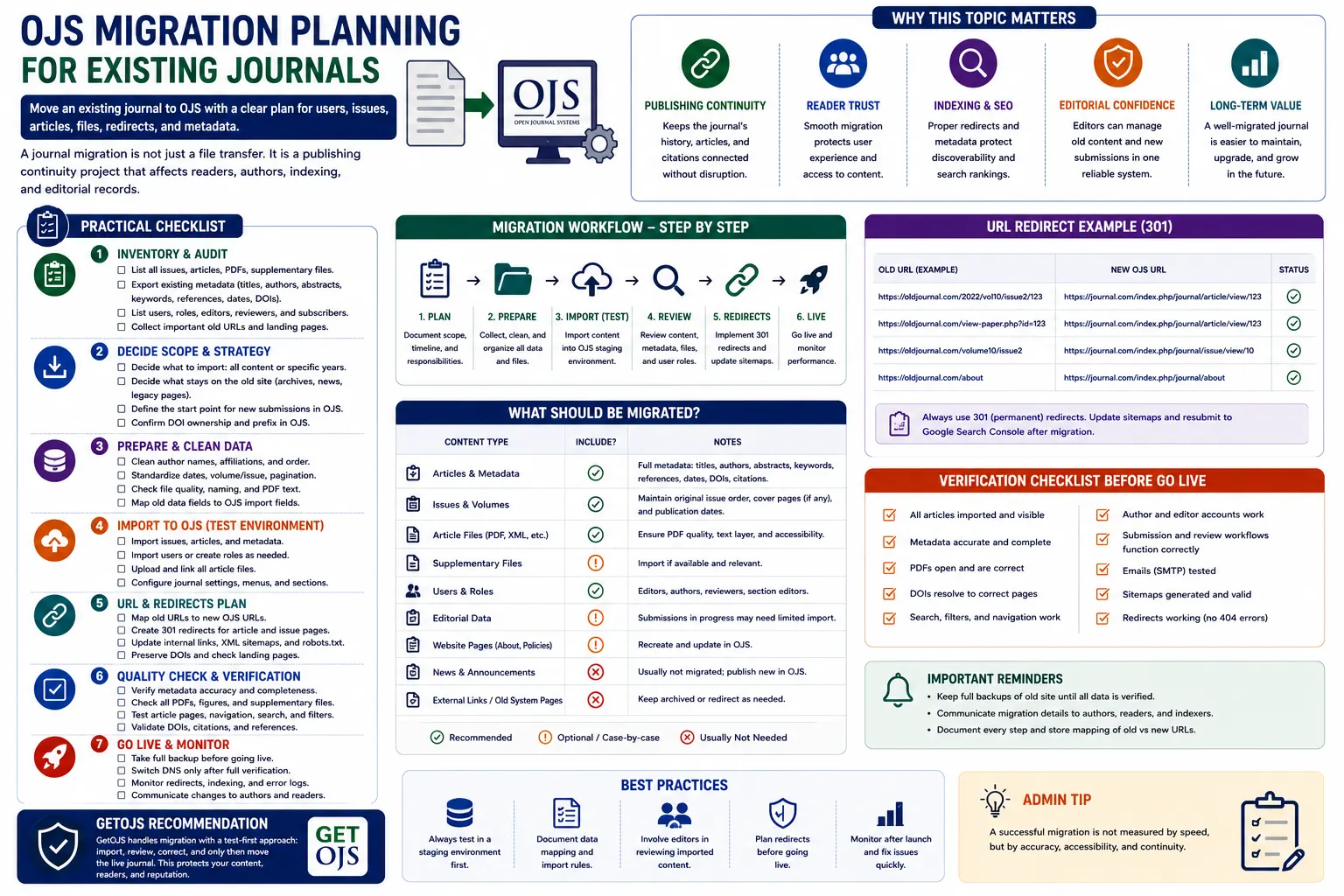
Migrating an existing journal to Open Journal Systems is not only a technical file transfer. It is a publishing continuity project. A journal already has published articles, issue archives, author records, reviewer history, editorial decisions, PDFs, metadata, DOI links, indexing visibility, and reader traffic. If migration is not planned properly, the journal may face broken links, missing article files, incorrect metadata, duplicate content, user confusion, and indexing problems.
Why OJS Migration Needs Careful Planning
Many journal teams decide to move to OJS because they want a better editorial workflow, structured publishing system, article archive, metadata management, DOI support, indexing compatibility, and professional journal presentation. OJS is a strong choice for academic publishing, but migration should be handled step by step. The goal is not only to make the new website live. The goal is to preserve the journal’s publishing record and make sure authors, readers, editors, and indexing platforms can continue working without disruption.
A successful OJS migration should answer key questions before any data is moved. How many articles need to be migrated? Are PDFs available for all articles? Are abstracts, keywords, authors, affiliations, references, DOI numbers, and issue details complete? Are there old article URLs that already appear in Google Scholar, Crossref, Scopus, indexing databases, or university repositories? Are users and editorial records required, or only published content? These questions help define the migration scope.
1. Start with a Complete Content Inventory
The first step is to prepare a complete inventory of the existing journal content. This inventory should include all volumes, issues, articles, PDFs, supplementary files, authors, publication dates, article titles, abstracts, keywords, DOI numbers, page numbers, and existing URLs. If the old journal website is built on WordPress, HTML, another CMS, or a custom system, the content may be stored in different places. Some files may be inside folders, some may be in database tables, and some may only be available as public web pages.
A content inventory helps identify missing or inconsistent data before migration begins. For example, some old articles may not have abstracts, some PDFs may have different file names, some issue numbers may be formatted differently, and some author names may have spelling variations. Fixing these issues before import makes the final OJS journal cleaner and more reliable.
- List all volumes, issues, article titles, authors, and publication dates.
- Collect all article PDFs and supplementary files in a structured folder.
- Prepare metadata such as abstracts, keywords, DOI, page numbers, and references.
- Record old article URLs for future redirect planning.
2. Decide the Migration Scope
Not every migration has the same requirement. Some journals only need published articles and issue archives imported into OJS. Others need complete editorial workflow history, users, submissions, reviewer assignments, and email records. Some journals may want to migrate only recent years and keep older content in a separate archive. The migration scope should be clearly decided before work begins.
If the journal is moving from another OJS installation, a full OJS-to-OJS migration may include database, files directory, public files, plugins, themes, and configuration details. If the journal is moving from a non-OJS system, the migration may involve preparing XML, CSV, or manual structured import. The route depends on the source platform and the quality of available data.
3. Prepare Metadata Carefully
Metadata is one of the most important parts of journal migration. Readers may see the PDF, but indexing platforms depend heavily on metadata. Article title, author names, affiliations, abstracts, keywords, DOI, publication date, issue number, references, and language fields should be reviewed carefully. Poor metadata can affect discoverability and indexing quality after migration.
Existing citations should also be protected. If an article already has a DOI, it must be migrated correctly. DOI numbers should not be changed unnecessarily. Article URLs may change when moving to OJS, but DOI resolution and redirect planning should reduce disruption. Metadata consistency is especially important for journals already indexed or applying for indexing.
4. Plan URL Redirects Before Launch
One of the biggest risks during migration is broken URLs. Old article pages may already be listed in search engines, shared in citations, added to library systems, or linked from author profiles. If those URLs stop working after migration, readers will face 404 errors and indexing visibility may be affected.
Redirect planning should happen before DNS changes. Create a map of old article URLs and new OJS article URLs. Important pages such as article detail pages, PDF links, current issue, archives, about page, editorial board, author guidelines, and contact page should be redirected properly. A 301 redirect is usually preferred when the old URL is permanently moved to a new location.
- Map old article pages to new OJS article pages.
- Redirect old PDF links to new article or galley URLs.
- Preserve important pages like archives, submissions, editorial board, and contact.
- Test redirects before making the new site live.
5. Review Users and Roles
User migration should be handled carefully. Existing journals may have authors, editors, reviewers, journal managers, and administrators. Some accounts may be active, while others may be old or unused. Before importing users into OJS, it is useful to clean the list and decide which accounts are required.
If the journal is migrating only published content, it may not be necessary to migrate every old user account. If the journal is migrating active submissions and editorial workflow, user roles become more important. Editors, section editors, reviewers, and authors should be mapped correctly so workflow can continue without confusion. Account security should also be reviewed, especially for administrator-level users.
6. Prepare the New OJS Installation
Before importing content, the new OJS installation should be prepared properly. This includes installing the correct OJS version, configuring the journal path, setting basic journal information, enabling required plugins, setting email configuration, choosing or developing a theme, configuring languages, and preparing file storage. If the journal has DOI, ORCID, indexing, statistics, or sitemap requirements, those plugins should be reviewed before migration.
The new OJS setup should not be treated as a blank website where content is simply uploaded. It should be configured as a publishing platform. Journal title, ISSN, publisher details, contact email, editorial team, author guidelines, publication ethics, peer review policy, copyright statement, privacy statement, and indexing details should be updated before launch.
7. Use a Staging Site First
Migration should always be tested on a staging site before going live. A staging site allows the team to import content, review article pages, check PDF links, test metadata, verify theme layout, and confirm plugin behavior without affecting the live journal. It also allows editors and journal owners to review the migrated data before public launch.
During staging review, check a sample from each volume and issue. Do not review only the latest issue. Older issues may have different formatting, missing metadata, or file naming problems. Testing across the full archive helps catch problems early.
8. Test Article Pages and PDFs
After migration, article pages must be checked carefully. Each article should show the correct title, author list, abstract, keywords, publication date, issue assignment, DOI, and PDF galley. PDF files should open correctly and should match the correct article. If supplementary files are included, they should also be tested.
It is also useful to check long titles, multiple authors, special characters, multilingual abstracts, mathematical symbols, and non-English content. These areas can sometimes create display or encoding issues during migration. Fixing them before launch improves quality and reduces complaints from authors.
9. Check Theme, Navigation, and Mobile Layout
Migration is a good opportunity to improve the journal’s design and navigation. The new OJS website should make it easy to find current issue, archives, author guidelines, submission link, editorial board, indexing information, and contact details. A clean layout builds trust and improves the reader experience.
Mobile testing is important. Many users open journal pages from email links, search results, or social sharing on mobile devices. Menus should work properly, article pages should be readable, buttons should be visible, and PDFs should be easy to access. A migrated journal should not only preserve old content; it should improve usability.
10. Verify Email and Workflow Settings
If the journal will manage new submissions in OJS, email and workflow settings must be tested. Authors should receive submission confirmations. Editors should receive notifications. Reviewers should receive invitations. Password reset emails should work. SMTP configuration, sender email, reply-to email, and domain email records should be reviewed.
Editorial workflow should also be tested with a dummy submission. Check submission steps, file upload, editor assignment, reviewer invitation, review decision, copyediting, production, and publication. This helps confirm that the journal is ready not only for archived content but also for future publishing activity.
11. Plan DNS and Launch Carefully
The final launch should be planned during a low-traffic period. Before DNS change, take a final backup of the old website. Freeze content changes during the final migration window so no new articles or updates are missed. After DNS points to the new OJS website, test the homepage, article pages, login, submission, PDF files, redirects, SSL certificate, and contact forms immediately.
Keep the old website backup safely for future reference. Do not delete old data immediately after launch. Some missing metadata or files may be discovered later, and the old backup may be needed to restore or verify information.
12. Post-Migration Quality Review
Migration is not finished on launch day. A post-migration review should be completed after the website goes live. Check search indexing, sitemap, robots settings, Google Search Console, DOI links, article redirects, PDF access, and analytics. Ask editors to review important pages and confirm that journal information is correct.
Monitor errors for a few weeks. Watch for 404 pages, broken PDFs, missing images, failed emails, and user login issues. Early monitoring helps solve problems before they affect too many users.
Practical OJS Migration Checklist
- Collect full backup of the old website, database, and article files.
- Create a complete inventory of volumes, issues, articles, PDFs, and metadata.
- Decide whether to migrate only published content or complete editorial workflow.
- Prepare the new OJS installation with correct journal settings and plugins.
- Import content on staging and review before public launch.
- Map old URLs to new OJS URLs and test redirects.
- Check article metadata, DOI, PDF, issue assignment, and author details.
- Test submission workflow, email delivery, login, and user roles.
- Launch with DNS planning, SSL verification, and final post-launch testing.
GetOJS Recommendation
GetOJS recommends a test-first migration process: inventory, prepare, import, review, correct, test, and only then launch the live journal. Moving too quickly can create broken links, missing files, metadata errors, and workflow problems. A structured migration protects the journal’s publishing history and gives editors confidence in the new platform.
A good OJS migration should preserve the old journal’s value while improving future publishing. With proper planning, the new OJS website can become cleaner, faster, more organized, easier to manage, and better prepared for indexing and long-term growth.
Need help migrating your existing journal to OJS?
Our team can help migrate articles, issues, PDFs, metadata, users, redirects, themes, plugins, and complete journal workflows safely.