
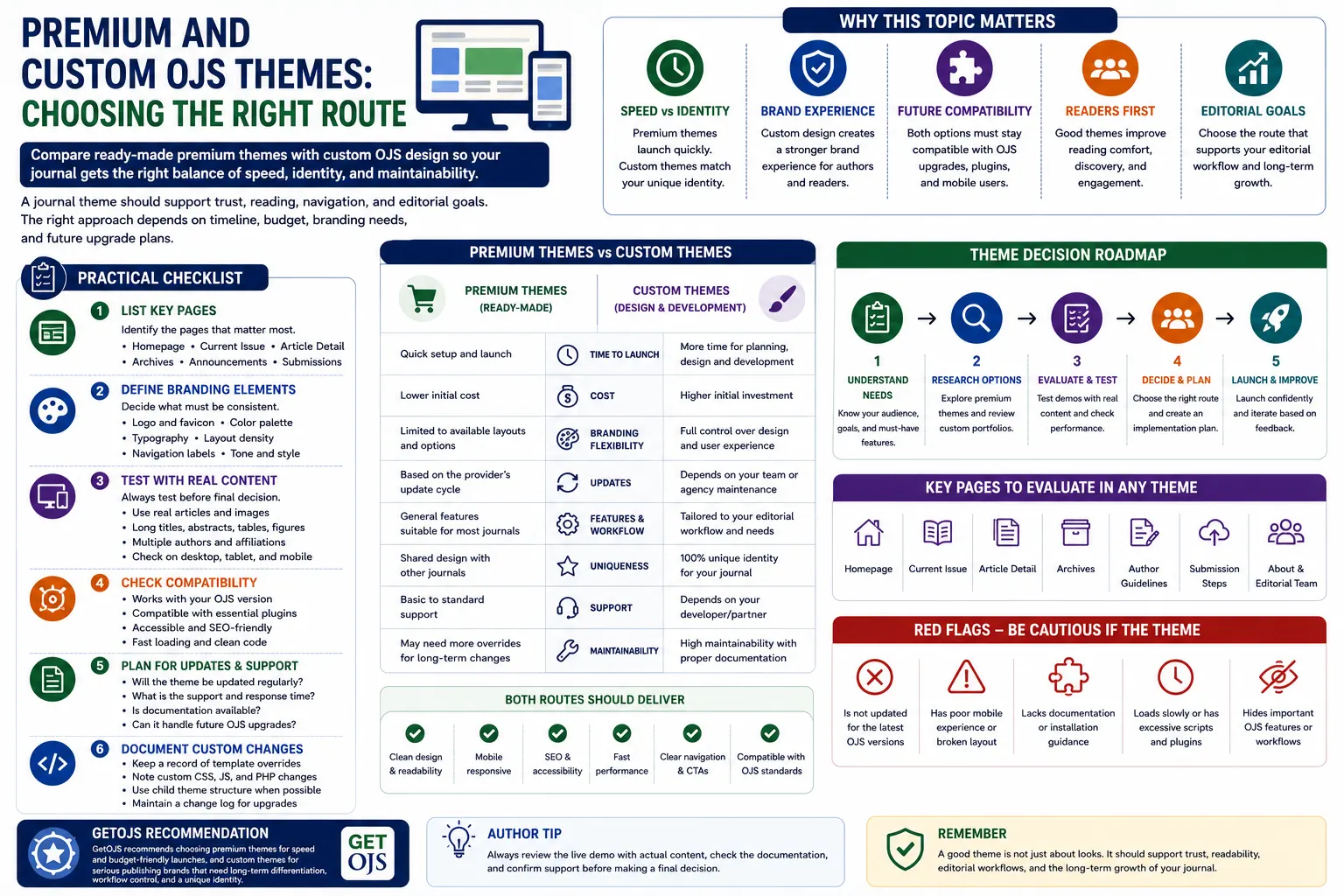
A journal website is more than a place where articles are published. It is the first impression for authors, readers, reviewers, editors, indexing agencies, and institutional partners. In Open Journal Systems, the theme plays an important role in how professional, readable, accessible, and trustworthy the journal appears. Choosing between a premium OJS theme and a fully custom OJS theme is therefore an important decision for any journal publisher.
Why Theme Selection Matters in OJS
The design of an OJS journal directly affects user experience. A clean and structured theme helps visitors find current issues, archives, submission guidelines, announcements, editorial board details, article metadata, and contact information without confusion. A poor theme can make even a high-quality journal look outdated or difficult to use. For new journals, this can reduce author confidence. For established journals, it can weaken brand value and reader engagement.
OJS themes also affect mobile usability, page speed, accessibility, plugin compatibility, and future upgrade work. A theme should not only look attractive on the homepage. It should work properly across article pages, issue pages, search pages, archive pages, author guidelines, login screens, registration forms, and editorial workflow areas. This is why the decision should be based on more than visual appearance.
What Is a Premium OJS Theme?
A premium OJS theme is a ready-made professional theme that can be installed and configured faster than a custom-built design. It usually comes with predefined layouts, color options, homepage sections, typography, responsive structure, and design components. Premium themes are useful for journals that want a better appearance quickly without going through a long design and development process.
Premium themes are often suitable for newly launched journals, small publishers, conference journals, institutional journals with limited budgets, or journals that need a quick redesign. They provide a structured starting point and reduce the time required to make the website presentable. If the selected theme is well-developed and compatible with the installed OJS version, it can be a practical and cost-effective option.
Benefits of Premium OJS Themes
- Premium themes can be launched quickly compared to custom development.
- They are usually more affordable than fully custom theme design.
- They provide a professional layout without starting from zero.
- They are helpful for journals that need a clean and modern look immediately.
- They reduce design planning time because many components are already prepared.
Limitations of Premium OJS Themes
Premium themes are fast and convenient, but they may not fully match a journal’s identity. Many journals have specific branding requirements such as university colors, logo placement, editorial board presentation, special homepage sections, multilingual design, unique article display requirements, or subject-specific design style. A ready-made theme may need extra customization to meet these expectations.
Another limitation is similarity. If many journals use the same premium theme with only minor changes, the website may not feel unique. This may not be a problem for small journals, but for serious publishing brands, universities, societies, and research organizations, stronger differentiation may be important. In such cases, a custom OJS theme may be a better long-term route.
What Is a Custom OJS Theme?
A custom OJS theme is designed and developed specifically for one journal, publisher, or institution. It can follow the exact brand identity, content structure, workflow requirement, and visual direction of the organization. Instead of fitting the journal into an existing layout, the theme is planned around the journal’s actual needs.
Custom theme development can include a unique homepage, improved article detail page, better issue archive layout, custom journal information blocks, editorial board sections, indexing display, announcement design, call-for-paper sections, submission buttons, author guideline pages, and improved footer structure. A custom theme gives more control over design, but it also requires more planning, testing, and future maintenance.
Benefits of Custom OJS Themes
- Custom themes create a unique identity for the journal or publisher.
- They can be designed according to exact branding requirements.
- They allow better control over homepage sections and journal-specific content.
- They can improve user experience for authors, readers, editors, and reviewers.
- They are suitable for long-term publishing brands that need differentiation.
Limitations of Custom OJS Themes
A custom theme requires more time than a premium theme. The process usually includes requirement collection, design planning, layout approval, frontend development, OJS template integration, responsive testing, browser testing, plugin testing, and final deployment. If the project is not documented properly, future OJS upgrades may become harder.
Custom themes can also cost more because they involve design and development work specific to the journal. However, for journals that treat their website as a long-term publishing platform, this investment can be worthwhile. The key is to ensure that the custom theme is developed cleanly, without unnecessary changes to OJS core files, and with proper documentation for future support.
Premium Theme vs Custom Theme: Which One Should You Choose?
The right choice depends on your journal’s goals. If your main priority is quick launch, limited budget, and basic professional appearance, a premium OJS theme may be enough. It gives your journal a polished look without a long timeline. You can still customize colors, logo, menus, banners, and selected page sections to make it more suitable.
If your journal belongs to a university, academic society, research organization, publisher, or professional association, and you want a strong identity, custom theme development may be the better route. A custom theme is also helpful when your journal has complex content needs, multiple journals under one brand, subject-specific design expectations, or a need for unique homepage sections.
Important Pages to Review Before Choosing a Theme
Many journal teams only check the homepage before selecting a theme. This is a mistake. In OJS, many important user journeys happen beyond the homepage. Authors visit submission guidelines. Readers visit article pages. Editors access workflow pages. Indexing teams check metadata and journal information. Reviewers may use login and task pages. A good theme should support all of these areas.
- Homepage layout and journal introduction section.
- Current issue and archive pages.
- Article detail page with title, authors, abstract, keywords, DOI, PDF, and references.
- About, editorial board, indexing, ethics, and submission pages.
- Mobile navigation, footer links, and call-to-action buttons.
Mobile Experience Should Be a Priority
A large number of users open journal websites on mobile devices. Authors may check submission instructions from phones. Readers may open article pages from search results. Reviewers may access links from email. If the theme is not mobile responsive, the website can lose trust immediately. Menus should open correctly, article titles should not overflow, buttons should be easy to tap, and PDF links should be visible.
Whether you choose a premium or custom theme, always test it on different screen sizes. Check long article titles, multiple authors, long keywords, tables, announcements, and sidebar content. A theme that looks good only on desktop is not enough for modern journal publishing.
Theme Compatibility with OJS Upgrades
OJS is updated over time, and themes must remain compatible with the version being used. A theme that works in one OJS version may need changes after an upgrade. This is especially true when templates, hooks, plugin structure, or frontend assets change. Premium themes should come from a reliable provider who can support updates. Custom themes should be developed with clean coding practices and proper documentation.
Before upgrading OJS, always test the theme on a staging copy. Do not directly upgrade a live journal without checking theme behavior. Review homepage sections, article pages, submission pages, login, registration, plugin output, and mobile layout. This protects the journal from unexpected display issues after the upgrade.
SEO and Accessibility Considerations
A good OJS theme should support search engine visibility and accessibility. Clean heading structure, readable font size, proper contrast, image alt text, fast loading, mobile-friendly layout, and structured navigation all help users and search engines understand the website better. For journal websites, SEO is not only about ranking. It is also about making article pages, archive pages, and journal information easy to discover.
Accessibility is equally important. Academic content should be readable for all users. Avoid very light text, confusing buttons, poor spacing, broken menus, and hidden links. A professional OJS theme should make the journal easier to use, not just more decorative.
Practical Checklist Before Final Decision
- Decide your timeline: quick launch or planned custom build.
- Define your branding: logo, colors, fonts, spacing, and homepage style.
- Check all important OJS pages, not only the homepage.
- Test mobile responsiveness with real journal content.
- Confirm compatibility with your current OJS version.
- Review plugin output such as DOI, ORCID, statistics, and indexing tools.
- Keep documentation for any custom template or CSS changes.
GetOJS Recommendation
GetOJS recommends premium themes for journals that need a faster and affordable design upgrade. They are suitable when the journal needs a professional look quickly and does not require deep branding changes. For serious publishing brands, universities, societies, and organizations that want a unique identity, a custom OJS theme is the better long-term choice.
The best decision is not always based on budget alone. It should be based on publishing goals, brand value, upgrade planning, content structure, mobile experience, and future maintenance. A good OJS theme should support the journal for years, not just look attractive on the first day.
Need help choosing or developing an OJS theme?
Our team can help you select, configure, customize, or develop a professional OJS theme for your journal website.