
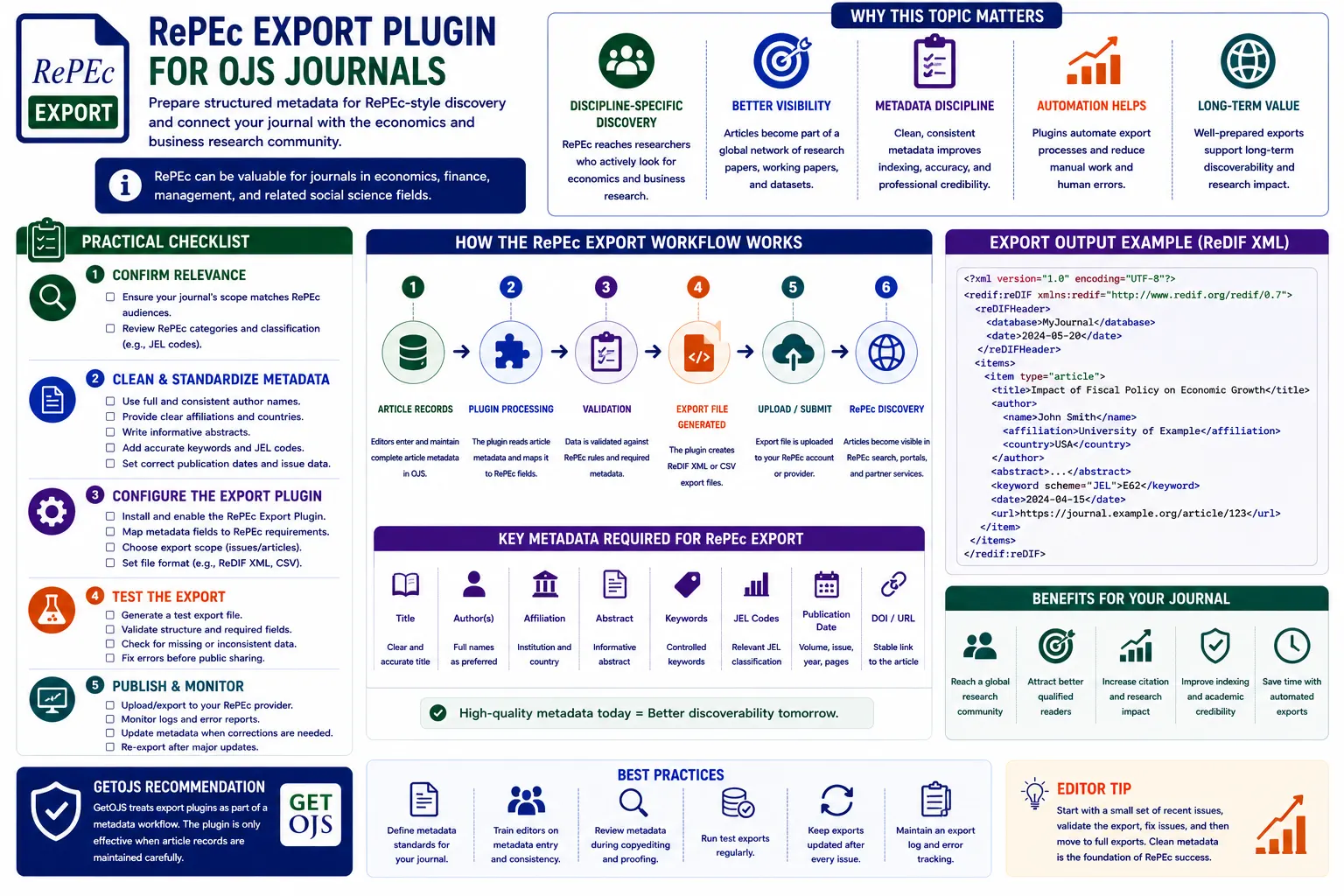
RePEc can be valuable for journals in economics, finance, management, business, public policy, development studies, and related social science fields. A RePEc Export Plugin for OJS can help journal administrators prepare article metadata in a structured format for RePEc-style discovery. However, the plugin alone is not enough. The quality of exported records depends on how carefully article metadata is entered, reviewed, corrected, and maintained inside Open Journal Systems.
What Is RePEc Export in OJS?
RePEc export is a workflow that prepares journal article records for discovery in economics-focused research networks. In an OJS journal, article information is already stored in structured areas such as title, abstract, keywords, authors, affiliations, publication date, DOI, issue, volume, pages, galley files, and article URLs. A RePEc export plugin can collect this information and prepare it in a format suitable for RePEc-related workflows.
For editors and publishers, this means less manual work. Instead of preparing records article by article in a separate file, the plugin can use OJS metadata as the source. But this also means that incorrect OJS metadata will produce incorrect export data. The export system is only as good as the records inside the journal.
Why RePEc Matters for Suitable Journals
Discipline-specific discovery is important. Researchers do not rely only on general search engines. They also use subject-specific platforms, library databases, DOI links, indexing services, and research repositories. For economics and related disciplines, RePEc can help put articles in front of a more focused research audience.
A journal that publishes economics, finance, business, banking, accounting, entrepreneurship, trade, policy, development, or econometrics research may benefit from preparing RePEc-ready metadata. This can improve article visibility among readers who are already interested in the subject area. It can also support the journal’s larger indexing and discovery strategy.
Which Journals Should Use a RePEc Export Plugin?
Not every OJS journal needs a RePEc export workflow. A medical, engineering, chemistry, law, or literature journal may not gain much from it unless it has a strong economics or policy focus. RePEc is most useful when the journal’s subject area matches the audience. Before installing or developing a plugin, the editorial team should first check whether the journal’s scope fits.
- Economics and applied economics journals.
- Finance, banking, accounting, and investment journals.
- Business, management, marketing, and entrepreneurship journals.
- Public policy, development studies, and trade-related journals.
- Interdisciplinary journals with strong economics or social science content.
Main Benefits of a RePEc Export Plugin
A RePEc export plugin can save time and reduce repetitive work. It can help administrators generate structured records from OJS data, update records after new issues are published, and maintain consistency across article exports. It can also encourage the editorial team to improve metadata quality because missing fields become easier to identify.
For a journal with many articles, manual export preparation can become slow and error-prone. A plugin can support a repeatable process. The team can review metadata, run export, check output, fix issues, and update the records whenever a new issue is published.
Important Metadata Fields for RePEc Export
Clean metadata is the heart of any export workflow. If article records are incomplete, the exported files will also be incomplete. Editors should review article metadata before publication and again before export. This is especially important for journals that migrated from another platform, because old records may have missing abstracts, inconsistent author names, or broken PDF links.
- Journal title, ISSN, publisher name, and journal URL.
- Article title, abstract, keywords, and subject area.
- Author names, affiliations, email visibility policy, and identifiers where available.
- Volume, issue, year, page range, article number, or elocation ID.
- DOI, article landing page URL, and PDF galley URL.
- Publication date, section, article type, and issue assignment.
How the Plugin Should Work
A practical RePEc export plugin should be simple for journal managers and administrators. It should allow the user to choose the journal, issue, date range, or publication status. It should generate output using approved article records only. It should not export unpublished submissions, incomplete drafts, rejected manuscripts, or private editorial files.
The plugin should also show warnings when important fields are missing. For example, if an article has no abstract, no author affiliation, missing publication date, broken PDF link, or empty DOI field, the plugin can show a validation notice. This helps editors fix records before export instead of discovering problems later.
Recommended Plugin Features
- Export by issue, year, date range, or selected articles.
- Validation report for missing metadata and broken article links.
- Support for DOI, article URL, PDF URL, volume, issue, and publication date.
- Export history so administrators know when records were generated.
- Admin-only access to avoid accidental export changes.
- Multi-journal support for publishers managing several OJS journals.
Editorial Workflow Before Export
Export should not be the first time the metadata is checked. Metadata review should be part of the production workflow. Before an article is published, the team should confirm title spelling, author order, affiliations, abstract, keywords, DOI, references, PDF galley, issue assignment, and publication date. If this is done properly, export becomes much easier.
A good workflow can follow this order: prepare article metadata, upload final PDF, assign issue, publish article, check public article page, verify DOI and PDF links, run export validation, fix warnings, generate export, and document the export date. This routine reduces errors and keeps records consistent.
Testing Export Files
Exported files should be tested before they are shared publicly or used in a production workflow. Administrators should check whether special characters, author names, abstracts, punctuation, and non-English text appear correctly. They should also confirm that article URLs and PDF URLs open without login requirements.
If the journal uses multilingual metadata, testing becomes even more important. Some characters may not display correctly if encoding is not handled properly. A plugin should support UTF-8 output and avoid breaking names, titles, and abstracts that include accents, symbols, or regional language text.
Handling Corrections After Export
Article metadata may change after publication. An author name may need correction. A DOI may be updated. A PDF may be replaced. An issue assignment may be adjusted. The RePEc export workflow should support corrections. If an exported record becomes outdated, the journal should regenerate and update the export.
This is why export history and documentation are useful. Administrators should know which records were exported, when they were exported, and what changed afterward. Without documentation, it becomes difficult to track whether RePEc records match the current OJS article pages.
Common Mistakes to Avoid
- Using RePEc export for journals outside the relevant subject area.
- Exporting unpublished submissions or incomplete article records.
- Ignoring missing abstracts, keywords, affiliations, or publication dates.
- Providing broken PDF links or article URLs that redirect incorrectly.
- Changing article URLs without updating export records.
- Assuming the plugin can fix poor metadata automatically.
RePEc Export and Multi-Journal OJS Portals
Publishers managing multiple journals need extra control. Some journals may be relevant to RePEc, while others may not. A multi-journal export plugin should allow administrators to select only eligible journals. It should not mix metadata from different journals or export records under the wrong journal title.
Each journal should have its own export settings, journal identity, ISSN, publisher name, URL, and metadata rules. This avoids confusion and keeps export records clean. Multi-journal systems should also use proper permissions so only authorized users can generate or update exports.
Security and Access Control
Export tools should be available only to trusted administrators or journal managers. The plugin may expose structured article metadata and file URLs, so access should be controlled. Editors may need to review metadata, but not every user should be allowed to generate or publish export files.
A secure plugin should follow OJS permission rules, avoid exposing private submission files, and export only published article information. It should also avoid storing unnecessary sensitive data.
Practical Checklist
- Confirm the journal subject area is relevant to RePEc audiences.
- Clean article metadata, author names, abstracts, keywords, and publication dates.
- Check volume, issue, DOI, article URL, and PDF galley links.
- Generate export first on staging or test mode where possible.
- Review validation warnings and correct metadata before final export.
- Document export date, issue coverage, and any corrections made.
- Maintain the workflow after every new issue or article publication.
GetOJS Recommendation
GetOJS treats export plugins as part of a metadata workflow. A RePEc Export Plugin is useful only when article records are maintained carefully. The plugin can automate export preparation, but editors and administrators must still ensure that metadata is complete, accurate, and consistent.
For economics, finance, business, management, and related journals, RePEc export can support subject-specific discovery and improve metadata discipline. The best approach is to combine a clean OJS setup, careful production review, export validation, and regular updates after publication. With the right workflow, a RePEc export plugin can become a practical tool for improving journal visibility and long-term discovery.
Need help configuring a RePEc export plugin for OJS?
Our team can help review metadata, develop export workflows, configure OJS plugins, test records, fix article URLs, and improve indexing readiness for your journal website.