
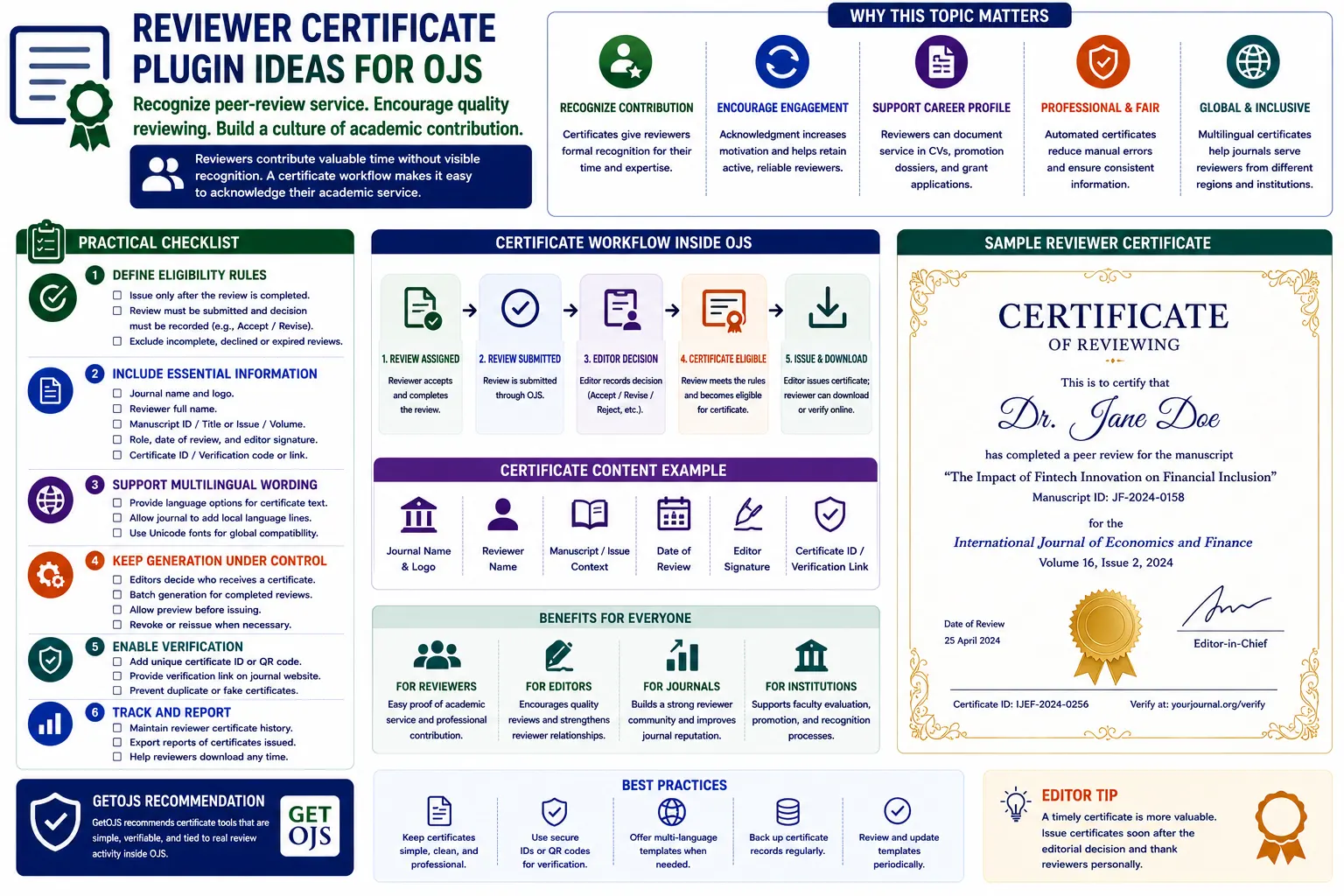
Peer reviewers contribute valuable time to academic publishing, but their work is often invisible. They read manuscripts, check methods, evaluate originality, suggest improvements, and help editors make better decisions. In many journals, this contribution is acknowledged only through a thank-you email. A Reviewer Certificate Plugin for OJS can make recognition more structured, professional, and easier to document.
Why Reviewer Certificates Matter
Review work is an important academic service. Researchers often need to document reviewing activity for promotion, appraisal, academic reporting, professional portfolios, institutional records, and personal achievement. A certificate can help reviewers show that they contributed to the peer-review process of a journal. It also shows that the journal values their time and expertise.
For editors, reviewer certificates can improve reviewer engagement. When reviewers feel recognized, they may be more willing to accept future invitations. This is especially useful for journals that struggle with delayed reviews or low reviewer response rates. A certificate does not replace proper editorial communication, but it can be a helpful recognition tool.
What a Reviewer Certificate Plugin Should Do
A good certificate plugin should not simply generate a generic PDF for anyone. It should be connected to real review activity inside OJS. Ideally, the certificate should be issued only after a reviewer has completed a review assignment and the editor has accepted or acknowledged the review. This prevents misuse and keeps the certificate meaningful.
The plugin can allow editors or journal managers to generate certificates from the review history. It may also allow reviewers to download certificates from their dashboard after completion. The right workflow depends on the journal’s policy. Some journals may prefer automatic generation, while others may want editorial approval before release.
Core Certificate Details to Include
- Reviewer name exactly as shown in the OJS user profile.
- Journal name and publisher or institution name.
- Review completion date or certificate issue date.
- Manuscript context, issue context, or general reviewing period based on journal policy.
- Editor-in-Chief name, managing editor name, or authorized signatory.
- Certificate ID, verification code, or QR code for authenticity.
Privacy and Blind Review Considerations
Reviewer certificates must respect the journal’s peer-review policy. If the journal uses double-blind review, the certificate should not reveal confidential manuscript details, author names, or decision information. Even in single-blind review, certificate wording should be careful. The certificate should recognize review service without exposing private editorial information.
A safe format can say that the reviewer completed peer-review service for the journal during a specific year or issue period. If manuscript-level details are included, the journal should ensure that this does not violate confidentiality. Many journals may prefer a general certificate that does not mention manuscript title or author information.
Manual vs Automatic Certificate Generation
Manual certificate generation gives editors more control. The editor can confirm that the review was completed properly before issuing the certificate. This is useful when the journal wants to avoid issuing certificates for incomplete, low-quality, or withdrawn review assignments. However, manual generation takes more time.
Automatic generation saves time but needs strong rules. For example, the plugin can generate a certificate only when the review status is completed and the review recommendation has been submitted. It can also require editor confirmation before the reviewer can download it. A balanced model is often best: automatic data capture with editorial approval.
Certificate Design Ideas
The certificate should look professional but not overly decorative. It should match the journal’s identity and include the logo, journal name, certificate title, reviewer name, recognition text, date, signature area, and verification details. The design should be readable in both digital and printed formats.
A clean layout is better than a heavy design. Avoid too many colors, low-quality logos, unclear fonts, or crowded text. If the certificate will be downloaded as PDF, make sure it prints clearly on standard paper sizes such as A4 or Letter.
Suggested Certificate Wording
The certificate text should be short, respectful, and accurate. It should not exaggerate the reviewer’s role or claim anything beyond the actual review service. A simple certificate can say that the journal gratefully acknowledges the reviewer’s contribution to the peer-review process.
Example wording: “This certificate is awarded to [Reviewer Name] in recognition of their valuable contribution as a reviewer for [Journal Name]. The journal appreciates their time, expertise, and support in maintaining the quality of scholarly publishing.” This wording is general and avoids confidential manuscript details.
Verification Features
Verification is important because certificates can be shared in academic profiles, portfolios, and institutional records. A certificate ID or QR code can help confirm authenticity. The QR code can link to a verification page where the certificate ID, reviewer name, journal name, and issue date can be checked.
Verification should show only safe information. It should not expose confidential review details. A public verification page can show certificate validity without revealing manuscript title, author name, review comments, or editorial decision.
Reviewer Dashboard Features
A useful plugin can add a “My Certificates” section in the reviewer dashboard. This section can show available certificates, issue dates, journal names, and download links. Reviewers can download certificates whenever needed without asking the editorial office repeatedly.
This reduces manual work for editors. It also gives reviewers a better experience because they can access their recognition documents easily. For multi-journal OJS portals, the dashboard can show certificates from different journals where the reviewer contributed.
Editor Control Panel Features
Editors and journal managers should have a control panel to manage certificates. They may need to search by reviewer name, review date, manuscript, issue, or certificate status. They should be able to approve, revoke, regenerate, or download certificates if needed.
The control panel can also help the journal export a reviewer recognition report. This report may include reviewer names, number of completed reviews, certificate status, and issue year. Such reporting can support annual reviewer appreciation lists.
Multilingual Certificate Support
Some journals serve authors and reviewers from different regions. A certificate plugin can support multilingual wording so the certificate can be generated in English and another journal language. This is useful for bilingual journals or journals with regional language requirements.
Multilingual support should be handled carefully. The reviewer name, journal title, and certificate ID should remain consistent, while the recognition wording can change based on selected language. The plugin should avoid broken characters or font issues when generating PDF certificates in different languages.
Security and Misuse Prevention
Certificate generation should be protected by permissions. Reviewers should not be able to create certificates for reviews they did not complete. Editors should not accidentally issue certificates for incomplete assignments. Administrators should be able to audit certificate activity.
The plugin should keep logs showing who generated a certificate, when it was generated, and whether it was downloaded or revoked. This protects the journal from misuse and helps resolve disputes later.
When Certificates Should Be Issued
- After a reviewer submits a complete review recommendation.
- After the editor confirms that the review was usable.
- After the review round is closed, if the journal prefers delayed recognition.
- At the end of the year for annual reviewer appreciation certificates.
- Only when the certificate does not violate review confidentiality.
Practical Plugin Ideas for OJS
- Generate PDF certificates from completed reviewer assignments.
- Add certificate templates with journal logo, signature, and footer text.
- Support certificate ID and QR verification.
- Allow editor approval before reviewer download.
- Add a reviewer dashboard area for certificate downloads.
- Support annual certificates for multiple completed reviews.
- Keep logs for generated, downloaded, and revoked certificates.
Common Mistakes to Avoid
- Issuing certificates before the review is completed.
- Including confidential manuscript or author details without policy approval.
- Using low-quality certificate design that looks unprofessional.
- Allowing certificates without verification or certificate IDs.
- Generating certificates manually without records or logs.
- Forgetting multilingual or special character support in reviewer names.
GetOJS Recommendation
GetOJS recommends certificate tools that are simple, verifiable, and tied to real review activity inside OJS. The certificate should recognize genuine peer-review contribution without exposing confidential manuscript details. A good workflow should include editor control, reviewer access, certificate verification, PDF generation, and clear policy rules.
Reviewer recognition does not need to be complicated. Even a clean certificate with verified details can improve reviewer satisfaction and reduce manual work for the editorial office. When designed properly, a Reviewer Certificate Plugin can support academic service recognition while keeping the peer-review process professional and trustworthy.
Need help building a reviewer certificate plugin for OJS?
Our team can help design, develop, configure, and maintain reviewer certificate workflows, PDF templates, verification pages, and OJS plugin features.