
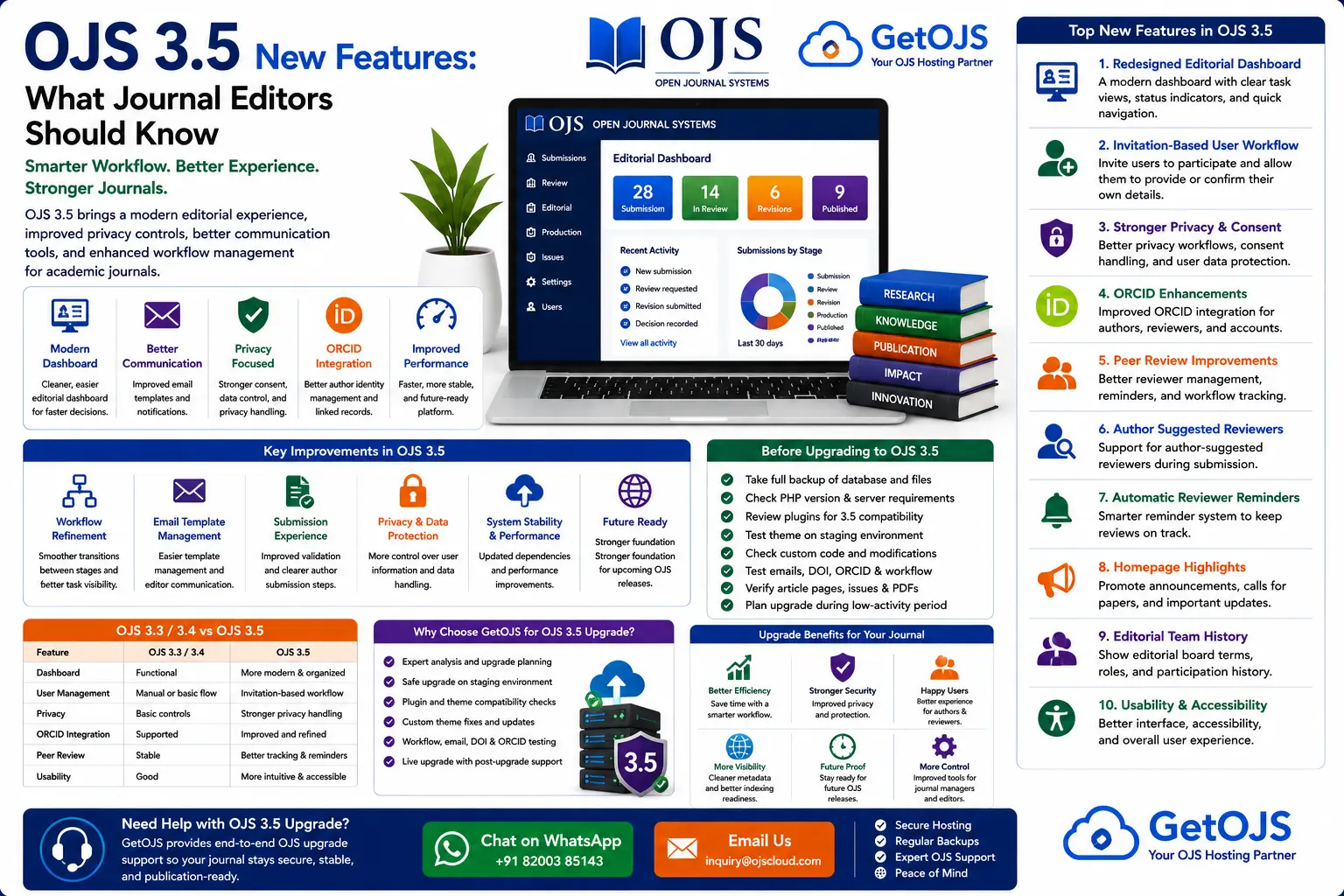
Open Journal Systems 3.5 is a major step forward for academic journals that want a cleaner editorial interface, stronger privacy controls, improved reviewer handling, and better long-term publishing management. For journals currently using OJS 3.3 or OJS 3.4, this version deserves careful attention because it changes several areas that editors, journal managers, authors, reviewers, and technical teams use every day.
What is OJS 3.5?
OJS 3.5 is a newer version of Open Journal Systems, the open-source journal management and publishing platform used by universities, research institutions, scholarly societies, independent publishers, and open access journals. The release focuses on improving the user experience, modernizing editorial workflow screens, strengthening privacy-related processes, and making journal management more efficient.
For many journals, upgrading to OJS 3.5 is not only about getting new features. It is also about preparing the journal for future versions, keeping the publishing platform secure, improving author and reviewer experience, and reducing the technical debt that builds up when older OJS versions remain unchanged for years.
Why OJS 3.5 matters for journal teams
Scientific journal publishing depends on organized workflow. Editors need to understand where each manuscript is, reviewers need simple access to assigned tasks, authors need clear submission steps, and journal managers need reliable tools for managing users, settings, metadata, issues, and publication schedules. OJS 3.5 improves several of these areas.
A good upgrade can reduce confusion inside the editorial office. When dashboards are easier to understand, email communication is cleaner, and privacy workflows are more controlled, journals can save time and provide a better experience for everyone involved in publication.
Main new features in OJS 3.5
1. Redesigned editorial dashboard
One of the most important improvements in OJS 3.5 is the redesigned editorial dashboard. The dashboard is where editors and journal managers spend much of their time, so even small usability improvements can make a big difference.
The newer dashboard experience is designed to help editorial teams see submission progress more clearly. Instead of jumping between too many scattered screens, editors can work with a more organized view of submission stages, task status, editorial actions, and workflow movement. This helps journals with active submission pipelines because editors can quickly identify which articles need screening, review, revision, copyediting, production, or publication scheduling.
For journals handling many submissions, this kind of interface improvement can reduce missed tasks and delayed decisions. It also helps new editors learn OJS more quickly because the system becomes easier to understand visually.
2. Improved submission management
Submission management is the central part of OJS. Authors upload manuscripts, editors screen them, reviewers evaluate them, and production teams prepare accepted articles for publication. OJS 3.5 improves the way submissions are managed so that editorial work becomes more practical and less confusing.
Clear submission tracking is especially useful for journals with multiple editors or section editors. Each participant needs to know what has already been completed and what should happen next. A cleaner submission management experience helps teams avoid duplicate messages, missed files, and unclear decision status.
3. New invitation-based user workflow
OJS 3.5 introduces a stronger invitation-based approach for user participation. Instead of always creating or managing user details manually, journal teams can invite users to participate and allow them to provide or confirm their own information. This is useful for reviewer invitations, editorial participation, and account accuracy.
This change is important for privacy and data control. When users provide their own details and consent, the journal can maintain cleaner records and reduce unnecessary manual handling of personal information. For journals concerned with data protection, consent, privacy policies, and responsible account management, this is an important improvement.
4. Better privacy and consent handling
Privacy has become a major concern in online publishing. Journals collect names, emails, affiliations, ORCID IDs, reviewer comments, author files, editorial discussions, and other sensitive records. OJS 3.5 strengthens the way user information and invitation workflows are handled.
For journal managers, this means the upgrade is also a good time to review the journal’s privacy statement, user registration settings, reviewer invitation process, and internal data access rules. A technical upgrade should be paired with policy review so that the journal’s public pages match the way the system is configured.
5. ORCID improvements
ORCID has become an important part of scholarly identity. It helps connect authors and reviewers to their research outputs and reduces confusion between researchers with similar names. OJS 3.5 improves the ORCID experience by making author and user identity workflows more closely connected with the platform.
For journals, better ORCID handling means cleaner author metadata, more reliable contributor identification, and improved publication records. This can support indexing, DOI metadata, research discovery, and long-term author profile accuracy.
6. Peer review workflow improvements
Peer review is one of the most important and time-sensitive parts of journal publishing. OJS 3.5 includes improvements that can help editors manage review assignments and reviewer communication more effectively.
Reviewers often miss deadlines because reminders are unclear, too late, or not configured properly. A better review workflow helps journals improve turnaround time. Editors can also benefit from improved visibility into review status, making it easier to decide whether to wait, send reminders, assign another reviewer, or move the submission forward.
7. Author-suggested reviewers
Some journals allow authors to suggest potential reviewers during submission. This does not mean the journal must use those reviewers, but it can help editors identify experts in specialized fields. OJS 3.5 improves support for this kind of workflow, depending on journal configuration.
Editors should still apply editorial judgment. Suggested reviewers should be checked for conflicts of interest, institutional overlap, recent collaboration, and subject relevance. Used properly, reviewer suggestions can speed up review without weakening editorial independence.
8. Automatic reviewer reminders
Reviewer reminders are important for maintaining publication timelines. OJS 3.5 improves reminder handling so journals can better communicate with reviewers before deadlines become a problem.
This is useful for journals that struggle with slow peer review. A timely reminder can help a reviewer complete the task before the due date instead of forcing the editor to react after the deadline has passed. Combined with clear email templates, reminders can improve reviewer response rates and editorial planning.
9. Homepage highlights and promotional sections
OJS 3.5 includes improvements that can help journals highlight important content. Journals often need to promote calls for papers, special issues, important articles, announcements, new issues, or editorial updates. A highlight feature can make the homepage more useful and more engaging for readers and authors.
For SEO and user experience, this is valuable because the homepage becomes more than a static journal title page. It can guide visitors toward important journal activity and encourage submissions, readership, and engagement.
10. Editorial team history
Editorial board transparency is important for journal credibility. OJS 3.5 includes improvements around editorial team history, helping journals show editorial participation over time. This can be useful for journals that want to document editor terms, board changes, and contributor history.
Clear editorial team information supports trust. Authors, readers, reviewers, indexing evaluators, and institutions often check whether a journal has a real and active editorial structure. Keeping this information organized helps demonstrate professionalism.
OJS 3.5 vs OJS 3.4: practical differences
OJS 3.4 already brought improvements over OJS 3.3, but OJS 3.5 continues the modernization process with more visible workflow and user-management changes. The biggest difference for many journals will be the editorial dashboard experience, invitation workflows, privacy-focused user handling, and ORCID-related improvements.
| Area | OJS 3.4 | OJS 3.5 |
|---|---|---|
| Editorial dashboard | Improved workflow foundation | More modern and organized submission dashboard |
| User invitations | Traditional account and workflow handling | Stronger invitation-based participation model |
| Privacy | Privacy features available through settings and policies | Better privacy-aware workflow direction |
| ORCID | Supported through configuration and integration | Improved identity and account-related experience |
| Review workflow | Stable peer review process | Better reminder and reviewer-management improvements |
Should your journal upgrade to OJS 3.5?
Most journals should plan an upgrade to OJS 3.5, but the upgrade should be handled carefully. A live journal contains published articles, author files, reviewer data, issue archives, plugins, themes, email templates, DOI settings, and editorial records. An upgrade without testing can create avoidable problems.
If your journal is actively publishing, the best approach is to upgrade between publication cycles or during a planned maintenance window. Journals with custom themes, old plugins, direct code changes, or large archives should be extra careful and test the upgrade on a staging website first.
What to check before upgrading to OJS 3.5
- Take a complete backup of database, public files, submission files, and configuration files.
- Create a staging copy before changing the live journal.
- Check active plugins for OJS 3.5 compatibility.
- Review custom theme templates, CSS, header, footer, article pages, and mobile layout.
- Test author submission, reviewer assignment, editorial decisions, copyediting, production, and publication.
- Check SMTP email, notification templates, DOI configuration, ORCID settings, and indexing plugins.
- Confirm that current issue, archives, article pages, and PDF links work correctly after the test upgrade.
Common risks during an OJS 3.5 upgrade
The main upgrade risks are plugin incompatibility, theme layout issues, server version mismatch, database migration errors, missing file permissions, email problems, and broken custom code. These risks can be reduced with proper preparation.
Journals that have modified core OJS files should be especially careful. Core changes can be overwritten during upgrade and may break custom behavior. GetOJS recommends documenting every customization before upgrade and moving custom work into safer theme or plugin structures where possible.
How GetOJS helps with OJS 3.5 upgrades
GetOJS provides technical support for journals planning to move to OJS 3.5. Our process is designed to reduce risk and protect journal data.
- Pre-upgrade audit of OJS version, hosting, plugins, theme, and custom changes.
- Full backup before any upgrade activity.
- Staging upgrade to test database migration and compatibility.
- Plugin and theme compatibility review.
- Testing of submission, review, copyediting, production, publication, email, DOI, and article pages.
- Live upgrade with post-upgrade monitoring and support.
Best practices after upgrading to OJS 3.5
After the upgrade, journal managers should not stop at checking the homepage. A proper post-upgrade checklist should include logging in as journal manager, editor, author, and reviewer; testing the submission process; confirming reviewer invitations; sending test emails; checking article pages; reviewing the current issue; confirming DOI display; and checking mobile layout.
The upgrade is also a good time to clean old plugins, update journal policies, improve email templates, check privacy text, review editorial board information, and improve homepage content. OJS 3.5 gives the journal a better foundation, but strong journal presentation still depends on good configuration and maintenance.
Frequently asked questions
What is the biggest change in OJS 3.5?
The biggest change for many journal teams is the improved editorial dashboard and workflow experience. It gives editors a clearer way to manage submissions and track journal activity.
Is OJS 3.5 good for journal privacy?
Yes. OJS 3.5 improves privacy-aware workflows, especially around user invitations and account information. Journals should still maintain clear privacy policies and review data handling practices.
Will my old OJS theme work in OJS 3.5?
It depends on how the theme was built. Some themes may require template updates, CSS fixes, or compatibility changes. Always test the theme on a staging copy before upgrading the live journal.
Can I upgrade directly from OJS 3.3 to OJS 3.5?
Some journals may be able to upgrade from OJS 3.3 to OJS 3.5 depending on their installation, server environment, and upgrade path. A technical review is recommended before attempting the upgrade.
Can GetOJS manage the full upgrade?
Yes. GetOJS can handle the upgrade process from audit and backup to staging, compatibility fixes, live deployment, and post-upgrade testing.
Planning to upgrade to OJS 3.5?
GetOJS can help you upgrade safely with backups, staging, plugin checks, theme fixes, testing, and ongoing OJS support.