
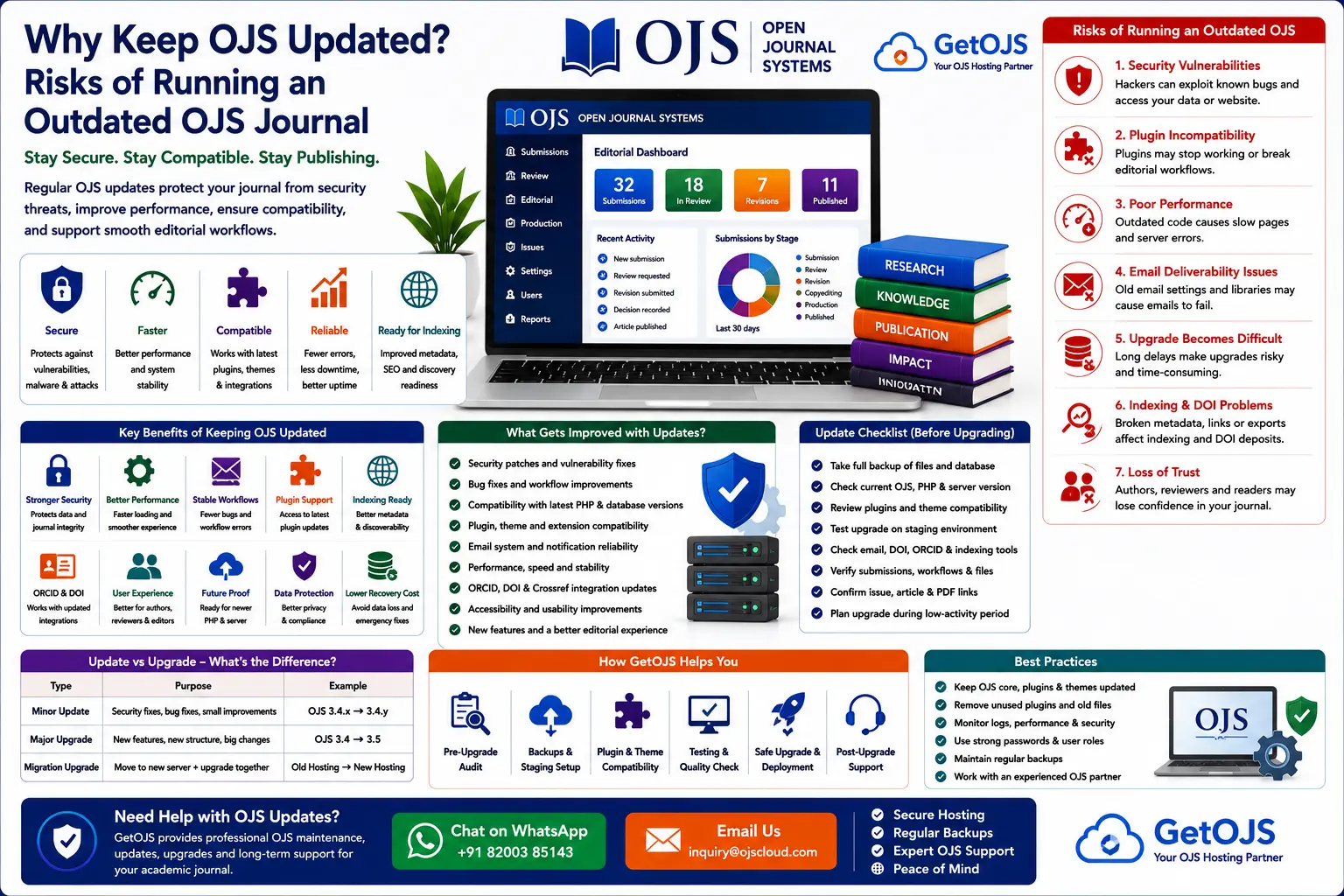
Open Journal Systems is a powerful platform for managing scholarly journals, but like every serious publishing system, it needs regular maintenance. Keeping OJS updated is not only a technical task. It is part of protecting your journal’s credibility, author data, reviewer records, published archives, DOI workflow, email delivery, indexing readiness, and editorial continuity.
Why OJS updates matter
OJS is used for much more than displaying articles. It manages submissions, review assignments, editorial decisions, author communication, article metadata, galley files, issue publication, user accounts, and journal settings. Because it handles both public content and private editorial information, the system must remain secure and stable.
An outdated OJS installation may continue to appear normal on the front end, but hidden problems can grow over time. Plugins may stop working correctly, emails may fail silently, server compatibility may become weaker, security vulnerabilities may remain open, and future upgrades may become more difficult. This is why GetOJS recommends treating OJS updates as a planned maintenance process rather than an emergency activity.
1. Security protection
Security is the most important reason to keep OJS updated. Academic journal websites can be attractive targets because they contain user accounts, author details, reviewer records, submission files, editorial discussions, published PDFs, and sometimes sensitive unpublished manuscripts.
Older versions of OJS may contain known vulnerabilities or outdated dependencies. If those weaknesses are not patched, attackers may attempt to upload malicious files, access restricted folders, abuse forms, exploit outdated plugins, inject spam links, or damage journal files. Even a small security issue can harm the journal’s reputation and create serious recovery work.
- Updated OJS versions reduce exposure to known vulnerabilities.
- Security patches help protect author, reviewer, and editor information.
- Modern versions work better with secure hosting environments.
- Regular maintenance reduces the chance of malware and hidden spam pages.
2. Better performance and stability
Performance matters for authors, readers, reviewers, editors, and search engines. A slow OJS website can discourage submissions, delay editorial work, and reduce reader engagement. Updates often include bug fixes, performance improvements, and compatibility changes that help the platform work better with current server technologies.
Outdated OJS installations may become slow because of old code, unsupported plugins, database overhead, poorly optimized themes, or hosting environments that no longer match the software requirements. Regular updates, combined with hosting optimization, can improve page loading, dashboard response, submission handling, and article access.
3. Plugin compatibility
OJS journals often depend on plugins for DOI management, Crossref exports, ORCID integration, statistics, custom blocks, indexing tools, language support, themes, payment workflows, and metadata features. These plugins are connected to the OJS version. If the journal remains outdated for too long, plugin compatibility becomes a major problem.
Some plugins may stop receiving support for older OJS versions. Others may work incorrectly after a server update. In some cases, a plugin may block the journal manager from accessing settings or may create fatal errors in the dashboard. A planned update process includes checking plugin compatibility before upgrading and removing unused or risky plugins.
4. Compatibility with external services
Modern journals depend on external services such as Crossref, ORCID, DOI registration agencies, Google Scholar, indexing databases, analytics tools, metadata harvesters, email services, and institutional repositories. These tools evolve over time. If OJS is not maintained, integration problems can appear.
For example, DOI deposits may fail because of outdated metadata handling. ORCID connections may need updated configuration. Email may stop reaching reviewers because SMTP settings are not aligned with modern email authentication. Indexing systems may have difficulty reading article metadata if the journal’s structure is inconsistent or technically broken.
5. Improved editorial workflow
Each major OJS version brings improvements to how editors, authors, and reviewers interact with the platform. These improvements may include better dashboards, clearer submission status, stronger email template management, improved reviewer handling, better author experience, accessibility changes, and workflow refinements.
If a journal stays on an older version for many years, the editorial team misses these improvements. Editors may spend more time handling routine tasks manually, authors may face confusing submission steps, and reviewers may struggle with older interface patterns. Upgrading helps the journal benefit from usability improvements that support smoother publishing.
6. Indexing and metadata readiness
Indexing services, repositories, and discovery systems depend on clean article metadata and stable public pages. OJS updates help keep the journal aligned with evolving metadata practices and technical standards. While an update alone does not guarantee indexing acceptance, it supports a healthier technical foundation.
For journals planning to apply to indexing databases, outdated OJS can create avoidable problems. Broken article URLs, inconsistent metadata, missing DOI information, invalid OAI-PMH output, slow pages, or poor mobile usability can weaken the journal’s technical presentation. Keeping OJS updated helps reduce these risks.
7. Server compatibility
Hosting environments change. PHP versions, database versions, web server configurations, security modules, and email policies are updated over time. An old OJS version may not work properly with newer server software, while older server software may become insecure or unsupported.
This creates a difficult situation: the journal cannot update the server because OJS is too old, and the journal cannot safely keep the old server because it may be insecure. Planned OJS updates prevent this problem by keeping the platform closer to current hosting standards.
Common risks of not updating OJS
Delaying updates may seem convenient in the short term, but it often creates larger problems later. The longer a journal waits, the more difficult the upgrade becomes.
- Security vulnerabilities remain open for attackers.
- Plugins may stop working or become incompatible.
- Custom themes may become harder to migrate.
- Email delivery can fail due to outdated configuration.
- Database upgrades can become more complex.
- Indexing and DOI workflows may face technical errors.
- Recovery costs can be higher if the website is hacked or broken.
OJS update vs OJS upgrade: what is the difference?
Many journal managers use the words update and upgrade interchangeably, but there is a practical difference. A minor update usually means moving within the same version branch to apply bug fixes and security patches. A major upgrade means moving to a newer main version, such as from OJS 3.3 to OJS 3.4 or OJS 3.5.
| Type | Purpose | Example |
|---|---|---|
| Minor update | Security fixes, bug fixes, small improvements | OJS 3.4.x to another 3.4.x release |
| Major upgrade | New features, new structure, larger compatibility changes | OJS 3.3 to OJS 3.4 or OJS 3.5 |
| Migration upgrade | Move journal to a new server and upgrade together | Old hosting to new managed OJS hosting |
Why updates should not be done directly on the live journal
Updating OJS directly on the live website is risky. If something fails during the database upgrade, plugin loading, theme rendering, or file permission process, the journal may go offline. Authors may not be able to submit, editors may not be able to access manuscripts, and readers may lose access to published articles.
The safer approach is to create a staging copy. A staging copy is a duplicate of the journal where the update can be tested before it is applied to the live website. This allows the technical team to check errors, plugins, theme layout, email templates, submission workflow, DOI settings, article pages, and user login before final deployment.
Safe OJS update checklist
Before updating an OJS journal, GetOJS recommends following a structured checklist:
- Take full backup of database, public files, submission files, and configuration file.
- Check current OJS version and target version.
- Review server requirements, PHP version, and database compatibility.
- Create a staging copy for testing.
- Review all active plugins and remove unnecessary ones.
- Check custom theme files, templates, and CSS changes.
- Test author submission, reviewer workflow, editorial decision, copyediting, and production.
- Test email delivery, DOI settings, article pages, PDF links, issue pages, and archives.
How GetOJS keeps OJS journals updated
GetOJS provides OJS maintenance and upgrade support for journals that want a safe and professional update process. Our team reviews the existing installation, prepares backups, tests updates in a staging environment, checks plugins and themes, fixes compatibility issues, and helps deploy the update with minimum disruption.
We also help journals plan long-term maintenance. This includes choosing a stable hosting environment, scheduling updates during low-traffic periods, checking logs after updates, reviewing security settings, and documenting major changes for the journal team.
Benefits of managed OJS maintenance
Managed OJS maintenance gives editors peace of mind. Instead of worrying about server errors, plugin failures, malware, backups, and upgrade conflicts, journal teams can focus on editorial quality and publication timelines.
- Regular technical review of the journal website.
- Safer upgrades with backup and staging support.
- Plugin and theme compatibility checks.
- Faster troubleshooting when errors appear.
- Better security, uptime, and publishing stability.
When should a journal update OJS?
A journal should review updates regularly, but the exact timing depends on the publishing schedule and technical condition. Security updates should be treated as high priority. Major upgrades should be planned carefully, especially when the journal has active submissions, custom themes, special plugins, or large archives.
The best time to upgrade is usually between issue publication cycles or during a planned maintenance window. If the journal is experiencing errors, spam, malware, plugin failures, or server compatibility problems, the update may need to be combined with cleanup and repair work.
Frequently asked questions
How often should OJS be updated?
Journals should review OJS updates regularly and apply security updates as soon as practical. Major upgrades should be planned, tested, and scheduled based on the journal’s publishing calendar.
Can an outdated OJS site be hacked?
Yes. Outdated OJS versions, old plugins, weak permissions, and insecure hosting can increase the risk of hacking, malware, spam injection, and data exposure.
Will updating OJS break my theme?
It can happen if the theme is old or heavily customized. That is why the theme should be tested on a staging copy before updating the live website.
Will my published articles be safe during an update?
Published articles should remain safe if the update is handled properly with full backups and staging tests. Never update without backing up the database and files.
Can GetOJS update my old OJS journal?
Yes. GetOJS can review your current OJS version, check the server, prepare backups, test the upgrade, fix plugin or theme issues, and update the live journal safely.
Need help updating your OJS journal?
GetOJS can safely update, upgrade, secure, migrate, and maintain your Open Journal Systems website with backup and staging support.